

































































Bforartists Extensions
Bforartists comes with default and included extensions based addons and themes to help improve the user experience. Some of these can be activated by the user and saved in the preferences for daily use. Many addons are…
Bforartists Extensions
Bforartists comes with default and included extensions based addons and themes to help improve the user experience. Some of these can be activated by the user and saved in the preferences for daily use. Many addons are shipped which include specific user experience improvements. Feel free to activate and use when necessary.
Default Extensions Addons
These addons are turned on by default and shiped with Bforartists. Most come directly from the Blender repository. These addons are split into official and community addons.
Activated Addons:
Official
- Animation: Pose Library
- Impot-Export: BioVision Motion Capture (BVH) format
- Import-Export: FBX format
- Import-Export: STL format
- Import-Export: Scalable Vector Graphics (SVG) 1.1 format
- Import-Export: Stanford PLY format
- Import-Export: UV Layout
- Import-Export: Wavvefront OBJ format (legacy)
- Import-Export: glTF 2.0 format
- Cycles
Official – Bforartists Exclusive
- Bforartists: 3D Sequencer
- Bforartists: Create IsoCam
- Bforartists: Default Asset Library
- Import-Export: Web3d X3D/VRML2 format
- Mesh: Mesh Tools – Bforartists version
- Bforartists: Smart Delete
- Bforartists: Align View Buttons
- Bforartists: Important Hotkeys Overlays
- Bforartists: User Settings
- Bforartists: 3D View Reset
Note: To activate/deactivate an addon, go to Edit – Preferences – Addons tab – and untick any activated addons.
If you’d like to keep your addons for future use, you can either save the preferences, or activate them on demand per workspace in the workspace settings in the property shelf.
Included Addons
Bforartists has included custom addons to improve the user experience. Most are activated by default, some are optional.
- 3D Sequencer
- Align View Buttons
- Brush Panels
- Create IsoCam
- Default Asset Library
- Find and Replace
- Important Hotkeys Overlays
- Mesh: Mesh Tools – Bforartists version
- Power User Tools
- Presentation Slider
- Reset 3D View
- Smart Delete
- User Settings
- X Ray Weight Paint
3D Sequencer
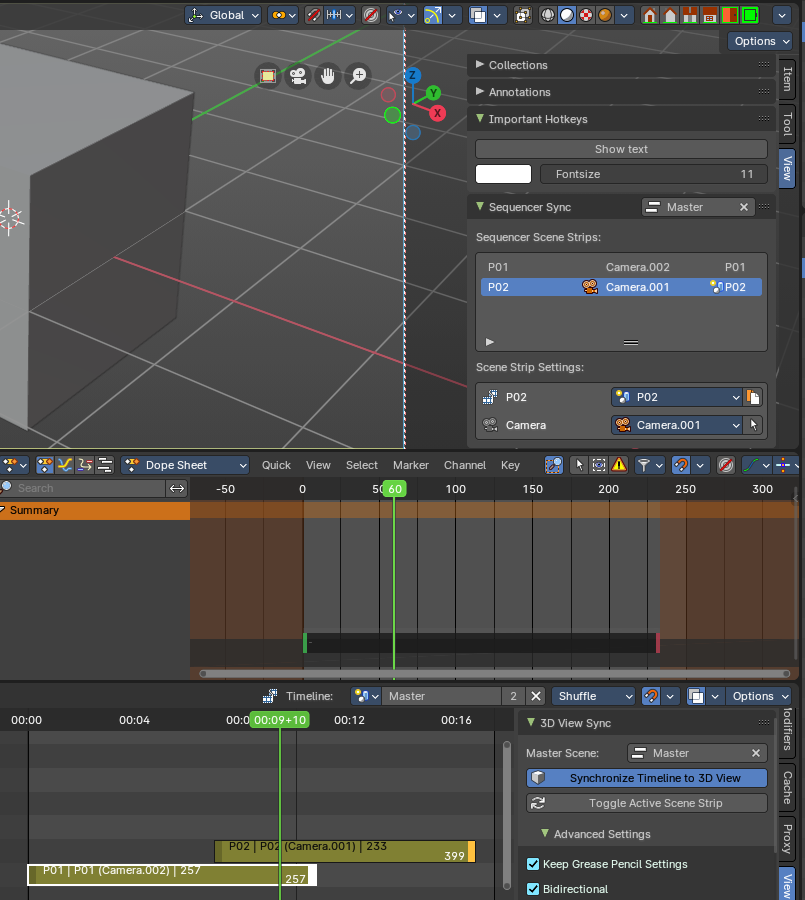
This addon is activated by default. This adds the ability to use the sequencer with the 3D View with a timeline. Using Scene Strips, you can switch the 3D View scenes with a master sequencer scene, like in a video editor.
This addon is thanks to Spa Studios, Znight, and Draise.
Align View Buttons
This addon is activated by default. This includes quick overlay and view settings that you can personalize to the top right of the 3D View Editor.
Brush Panels
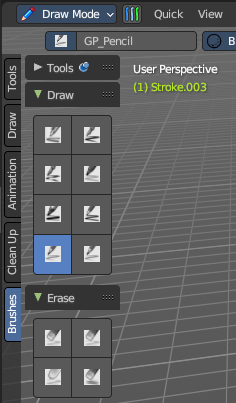
This addon is optional and deactivated by default. This adds a Brush Tab to most painting and drawing modes and objects. This includes panels per brush operator listing all brush types dynamically, including all listed brushes. This also includes custom icons and is repsonsive per the toolshelf standards.
This addon is thanks to Iyad Ahmed and Draise.
| Entry | What it does |
|---|---|
| Create Isocam | This addon is activated by default. Add the option to create orthographic iso cameras from the 3D View Add menu. |
| Default Asset Library | This addon is activated by default. This includes a default asset library shipped with Bforartists. To know more about what this library includes and how to access it, refer to chapter Asset Browser – Default Asset library |
Find and Replace
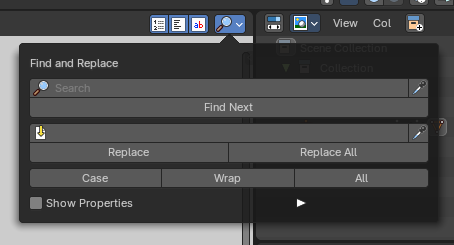
This addon is activated by default. This addon allows to press Shift + RMB to start searching from a pop-up panel in the Text Editor, and also adds the popup panel to the header.
Important Hotkeys
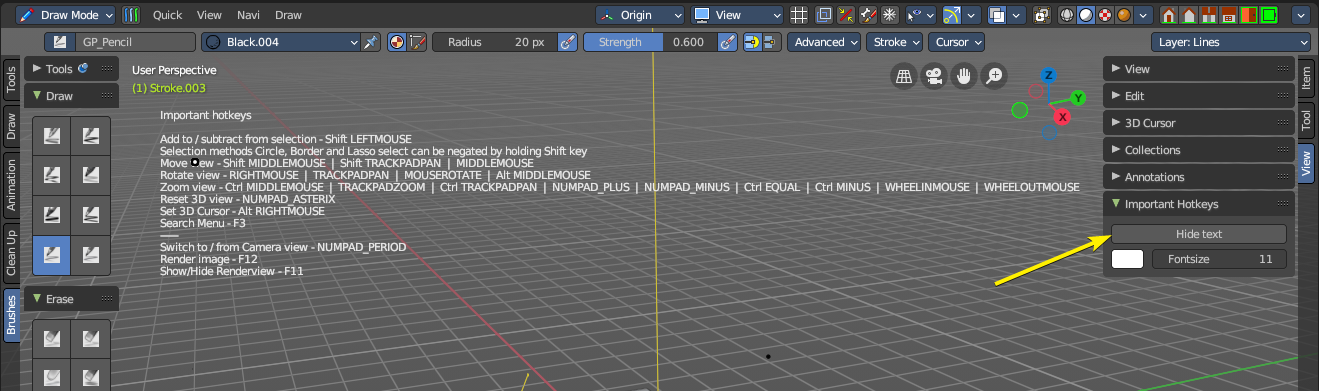
This addon is activated by default. This addon includes a button to show important hotkeys as an overlay in the 3D View, showing hotkeys.
This addon is thanks to Reiner.
| Entry | What it does |
|---|---|
| Mesh: Mesh Tools – Bforartists version | This addon is activated by default. This addon is a default Blender addon that has been modified to work with Bforartists in a better integrated way. |
| Power User Tools | This addon is optional and deactivated by default. This is an additional set of user experience tools and operators to assist every day use for the power user. |
Presentation Slider
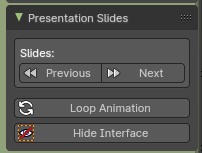
This addon is optional and deactivated by default. Adds controls to switch to the next Scene then plays the animation once, useful for presentation slides setup as Scenes. For more information in how to use it, refer to chapter Bforartists Presentation Slider
This addon is thanks to Draise.
Reset 3D View
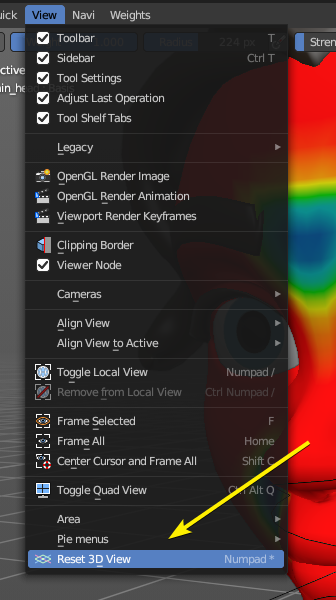
This addon is activated by default. This adds an operator to the interface to reset the view – both accessible in the 3D View – View header menu entry and the optional header buttons to the top right. You can alternatively use the *** key on the Numpad.
| Entry | What it does |
|---|---|
| Smart Delete | This addon is activated by default. This addon improves the user experience of deleting geometry, so that you can save a few clicks every time you want to remove geometry. Now it detects what you have selected and removes it in a predictable way. To use it, press Del on selected geometry. This addon is thanks to Reiner. |
| User Settings | This addon is activated by default. This stores the toolbar settings. It is important that you do not turn this addon off, it will break Bforartists functionality. |
X Ray Weight Paint

This addon is optional and deactivated by default. This addon helps automate the process of setting up xray painting for armature weight painting. This helps set up various user settings for a desired user experience.
This addon is thanks to Blender Boi. You can find the repository here: https://github.com/BlenderBoi/XRayWeightPaint-