
































































Editors

Select Menu
Here you will find the select functionality.
Select menu
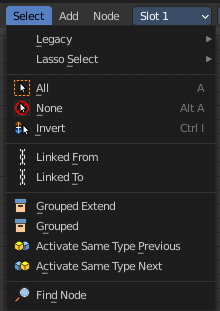
Here you will find the select functionality.
Legacy

The legacy sub menu contains tools that exists in the tool shelf already. It's the old way to do things. Different to the tools in the tool shelf, these tools are usually modal. And performs once. You have to call them again in case you want to repeat the tool.
| Entry | What it does |
|---|---|
| Box select | Draw a rectangle to select everything inside of the rectangle. It automatically adds to the current selection. Holding down shift subtracts from the selection. |
| Circle select | Brush select content. The radius of the brush can be adjusted by holding down left mouse button and using the scroll wheel or the + or - button at the numpad. It automatically adds to the current selection. Holding down shift subtracts from the selection. To exit the circle select tool click with the right mouse button. |
Lasso Select

A sub menu with the available lasso select modes.
| Entry | What it does |
|---|---|
| All | Select everything. |
| None | Select nothing. |
| Inverse | Invert the current selection. |
| Linked From | Select the nodes that are linked from the currently selected nodes. The nodes before in the hierarchy. |
| Linked To | Select the nodes that are linked to the currently selected nodes. The nodes behind in the hierarchy. |
| Grouped | Select grouped nodes. |
| Grouped Extend | Select grouped nodes, and extend from the current selection. |
| Activate same type previous | Activate same node type before the current selection, step by step. |
| Activate same type next | Activate same node type after the current selection, step by step. |
Find Node
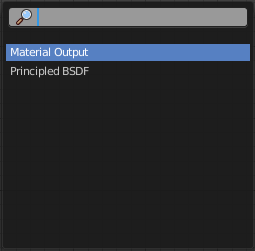
This button will open a search dialog where you can search for node types and select them in the current hierarchy.