

































































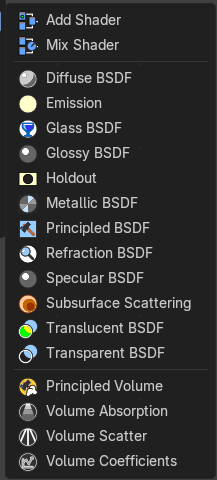
Add Menu - Shader
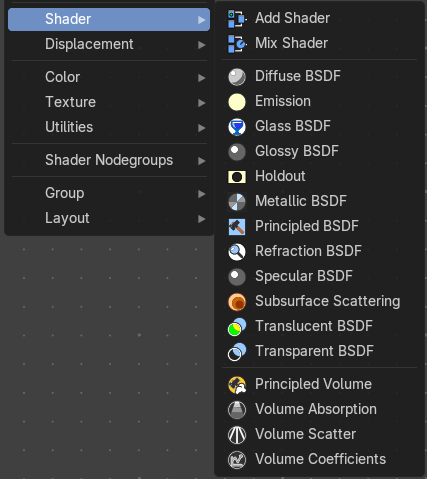
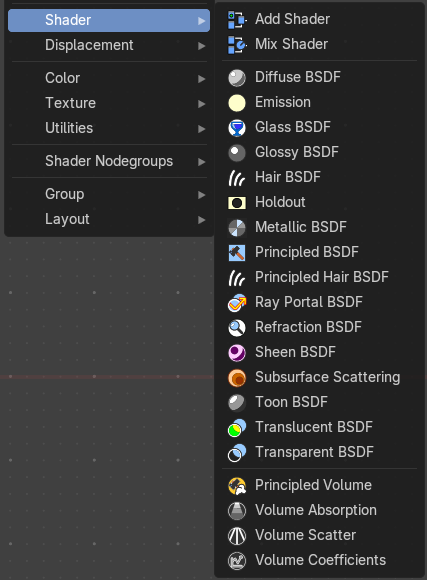
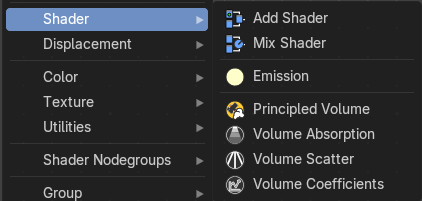
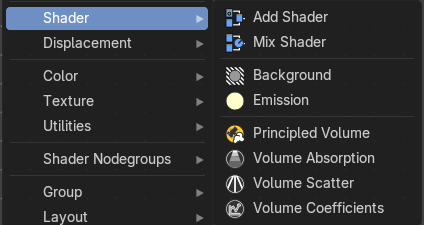
The shader section contains the different shader nodes. The content is different for the sub modes Object, World and Line Style. And it is dependant of the chosen render engine.
Add menu - Shader
The shader section contains the different shader nodes. The content is different for the sub modes Object, World and Line Style. And it is dependant of the chosen render engine.
Left Eevee, right Cycles and Workbench:
World / Line Art :
We will start with the Eevee shaders, and go through the other menus then.
Eevee
Add Shader
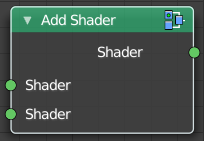
The Add node is used to add two Shaders together.
| Entry | What it does |
|---|---|
| Inputs | Shaders: Standard shader inputs. |
| Outputs | Shader: Standard shader output. |
Mix Shader
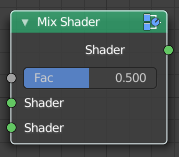
The Mix node is used to mix two shaders together. Mixing can be used for material layering, where the Factor input may, for example, be connected to a Blend Weight node.
| Entry | What it does |
|---|---|
| Inputs | Shader: Shaders to mix, such that incoming rays hit either with the specified probability in the Factor socket. · Factor: Blend weight to use for mixing two shaders; at zero it uses the first shader entirely and at one the second shader. |
| Outputs | Shader: Standard shader output. |
Diffuse BSDF
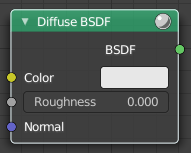
Shader Type Object
The Diffuse BSDF node is used to add Lambertian and Oren-Nayar diffuse reflection.
| Entry | What it does |
|---|---|
| Inputs | Color: Color of the surface, or physically speaking, the probability that light is reflected or transmitted for each wavelength. · Roughness Cycles Only: Surface roughness; 0.0 gives standard Lambertian reflection, higher values activate the Oren-Nayar BSDF. · Normal: Normal used for shading; if nothing is connected the default shading normal is used. |
| Outputs | BSDF: Standard shader output. |
Emission
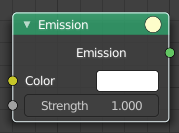
The Emission node emits light.
Inputs
| Entry | What it does |
|---|---|
| Color | Color of the emitted light. |
| Strength | Strength of the emitted light. For point and area lights, the unit is Watts. For materials, a value of 1.0 will ensure that the object in the image has the exact same color as the Color input, i.e. make it ‘shadeless’. |
Outputs
Emission
The Emission shader output can both be plugged into the Surface Input as well as the Volume Input of the Material Output node.
Glass BSDF
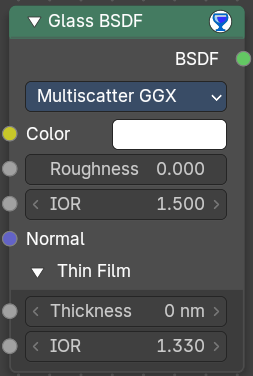
A glass shader.
Inputs
| Entry | What it does |
|---|---|
| Color | Color of the surface, or physically speaking, the probability that light is transmitted for each wavelength. |
| Roughness | Influences sharpness of the refraction; perfectly sharp at 0.0 and smoother with higher values. |
| IOR | Index of refraction (IOR) defining how much the ray changes direction. At 1. 0 rays pass straight through like transparent; higher values give more refraction. |
| Normal | Normal used for shading. |
| Thin film subpanel | Thin film is an optical effect where light interference in a very thin surface layer creates colorful, angle-dependent reflections (like soap bubbles or oil on water). · Thickness: Thin film thickness. · IOR: Thin film refraction factor. |
Properties
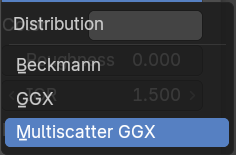
Distribution
The light scattering disribution model on rough surface.
Outputs
BSDF
Standard shader output.
Glossy BSDF
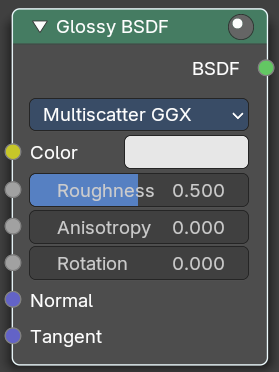
The Glossy BSDF node is used to add reflection with micro facet distribution, used for materials such as metal or mirrors.
Inputs
| Entry | What it does |
|---|---|
| Color | Color of the surface, or physically speaking, the probability that light is reflected for each wavelength. |
| Roughness | Input for the surface roughness resulting in sharp to blurry reflections. |
| Anisotropy | Anisotropy level |
| Rotation | Rotation of the glossy map. |
| Normal | Normal used for shading. |
| Tangent | Tangent used for shading. |
Properties
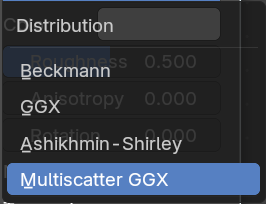
| Entry | What it does |
|---|---|
| Distribution | Micro facet distribution to use. |
| Sharp | Results in perfectly sharp reflections like a mirror. The Roughness value is not used. |
| Beckmann | Beckmann micro facet distribution. |
| GGX | GGX micro facet distribution. |
| Ashikhmin-Shirley | Ashikhmin-Shirley micro facet distribution. |
| Multiscatter GCX | Multiscatter GGX micro facet distribution. |
Outputs
BSDF
Standard shader output.
Holdout
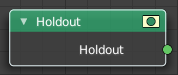
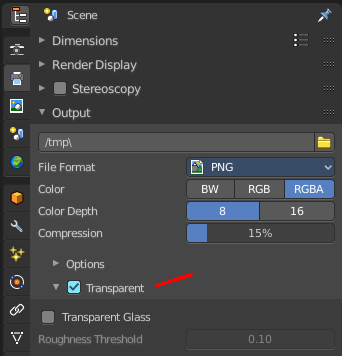
The Holdout shader node is used to create a “hole” in the image with zero alpha transparency, which is useful for compositing (see alpha channel).
Note that the holdout shader can only create alpha when Transparent is enabled. This can be found in the render settings. Properties > Render > Film > Transparent is enabled. If it is disabled, the holdout shader will be black.
Outputs
Holdout
Standard shader output.
Metallic BSDF
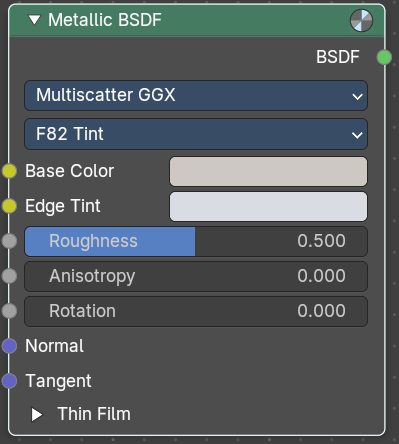
A metallic shader, which gives more realistic results than the glossy node.
Properties
Distribution
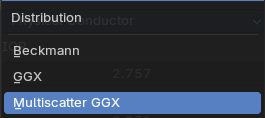
The available scatter methods. They all give a slighty differnt result.
Fresnel Type
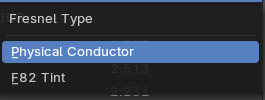
The fresnel type. Fresnel is a real life effect that adds a mirroring the more the angle diverts from the line of sight. At 90 degrees the mirroring is 100%.
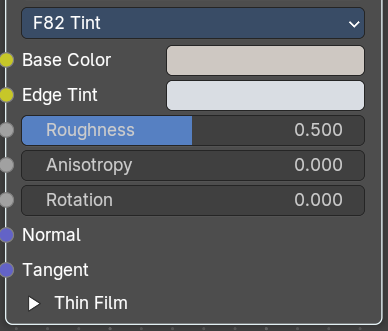
Input with F 82 Tint
| Entry | What it does |
|---|---|
| Base Color | The base color of the fresnel. |
| Edge Tint | The edge tint color of the fresnel. |
| Roughness | The roughness of the fresnel. 0 is 100% mirroring. |
| Anisotropy | Amount of anisotropy for reflection. |
| Rotation | Rotates the direction of anisotropy, with going full circle with a value of one. |
| Normal | Input normal |
| Tangent | Input tangent. |
Input with Physical Conductor
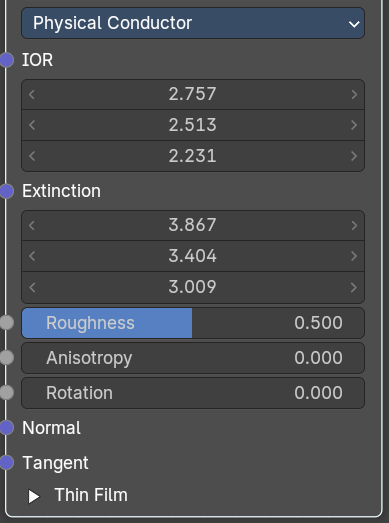
| Entry | What it does |
|---|---|
| IOR | The refractive index for all three axis. Mathematically called N |
| Extinction | Imaginary part of the refractive index. Mathematically called K |
| Roughness | The roughness of the fresnel. 0 is 100% mirroring. |
| Anisotropy | Amount of anisotropy for reflection. |
| Rotation | Rotates the direction of anisotropy, with going full circle with a value of one. |
| Normal | Input normal |
| Tangent | Input tangent. |
Thin film subpanel
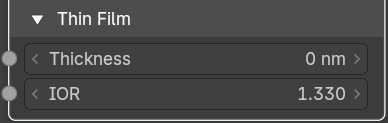
| Entry | What it does |
|---|---|
| Thickness | Thickness of the film in nanometers |
| IOR | Index of Refraction of the Thin Film. |
Output
BSDF
Shader output.
Principled BSDF
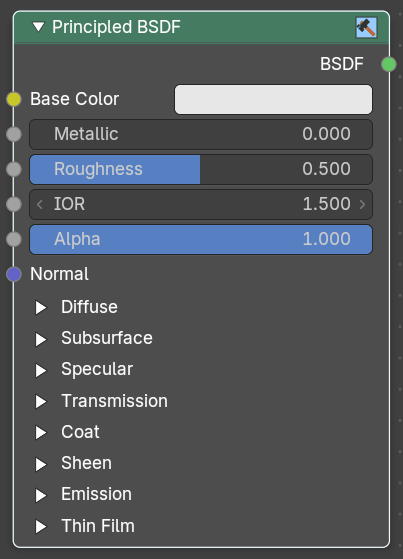
The Principled BSDF that combines multiple shader layers into a single easy to use node. It is based on the Disney principled model also known as the “PBR” shader, making it compatible with other software such as Pixar’s Renderman® and Unreal Engine®. Image textures painted or baked from software like Substance Painter® may be directly linked to the corresponding parameters in this shader.
This “Uber” shader includes multiple layers to create a wide variety of materials. The base layer is a user controlled mix between diffuse, metal, subsurface scattering and transmission. On top of that there is a specular layer, sheen layer and clear coat layer.
Note: The emphasis on compatibility with other software means that it interprets certain input parameters differently from older Blender nodes.
Inputs
| Entry | What it does |
|---|---|
| Base Color | Diffuse or metal surface color. |
| Metallic | Blends between a non-metallic and metallic material model. A value of 1.0 gives a fully specular reflection tinted with the base color, without diffuse reflection or transmission. At 0.0 the material consists of a diffuse or transmissive base layer, with a specular reflection layer on top. |
| Roughness | Specifies micro facet roughness of the surface for diffuse and specular reflection. Hint. When converting from the older Glossy BSDF node, use the square root of the original value. |
| IOR | Index of refraction for transmission. |
| Alpha | Controls the transparency of the surface, with 1.0 fully opaque. Usually linked to the Alpha output of an Image Texture node. |
| Normal | Controls the normals of the base layers. |
Subsurface Subtab
Mode Christensen-Burley
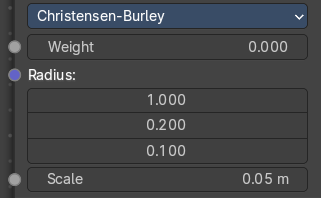
Christensen-Burley is an approximation to physically-based volume scattering. Gives less blurry results than Cubic and Gaussian functions.
| Entry | What it does |
|---|---|
| Weight | Mix between diffuse and subsurface scattering. Rather than being a simple mix between Diffuse and Subsurface Scattering, it acts as a multiplier for the Subsurface Radius. |
| Subsurface Radius | Average distance that light scatters below the surface. Higher radius gives a softer appearance, as light bleeds into shadows and through the object. The scattering distance is specified separately for the RGB channels, to render materials such as skin where red light scatters deeper. The X, Y and Z values are mapped to the R, G and B values, respectively. |
| Scale | Scale of the subsurf scattering ( multiplied with radius). |
Mode Random Walk
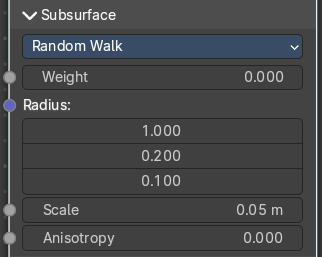
Random Walk Provides the most accurate results for thin and curved objects. This comes at the cost of increased render time or noise for more dense media like skin, but also better geometry detail preservation. Random Walk uses true volumetric scattering inside the mesh, which means that it works best for closed meshes. Overlapping faces and holes in the mesh can cause problems.
| Entry | What it does |
|---|---|
| Weight | Mix between diffuse and subsurface scattering. Rather than being a simple mix between Diffuse and Subsurface Scattering, it acts as a multiplier for the Subsurface Radius. |
| Subsurface Radius | Average distance that light scatters below the surface. Higher radius gives a softer appearance, as light bleeds into shadows and through the object. The scattering distance is specified separately for the RGB channels, to render materials such as skin where red light scatters deeper. The X, Y and Z values are mapped to the R, G and B values, respectively. |
| Scale | Scale of the subsurf scattering ( multiplied with radius). |
| Anisotropy | Adds some random directional light scattering. |
Mode Random Walk (Skin)
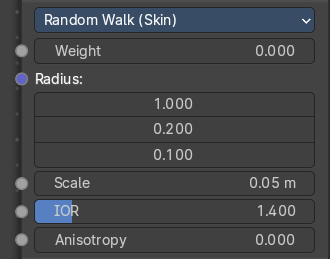
Random Walk Provides the most accurate results for thin and curved objects. This comes at the cost of increased render time or noise for more dense media like skin, but also better geometry detail preservation. Random Walk uses true volumetric scattering inside the mesh, which means that it works best for closed meshes. Overlapping faces and holes in the mesh can cause problems.
| Entry | What it does |
|---|---|
| Weight | Mix between diffuse and subsurface scattering. Rather than being a simple mix between Diffuse and Subsurface Scattering, it acts as a multiplier for the Subsurface Radius. |
| Subsurface Radius | Average distance that light scatters below the surface. Higher radius gives a softer appearance, as light bleeds into shadows and through the object. The scattering distance is specified separately for the RGB channels, to render materials such as skin where red light scatters deeper. The X, Y and Z values are mapped to the R, G and B values, respectively. |
| Scale | Scale of the subsurf scattering ( multiplied with radius). |
| IOR | Adds a refraction for more realistic results. |
| Anisotropy | Adds some random directional light scattering. |
Specular Subtab
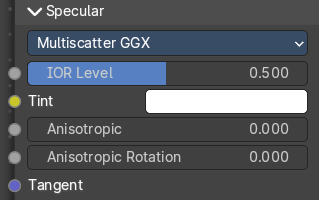
Specular Mode
| Entry | What it does |
|---|---|
| GGX | A method that is faster than Multiple-scattering GGX but is less physically accurate. Selecting it enables the Transmission Roughness input. |
| Multiple-scattering GGX | Takes multiple bounce (scattering) events between micro facets into account. This gives a more energy conserving results, which would otherwise be visible as excessive darkening. |
IOR Level
Amount of dielectric specular reflection. Specifies facing (along normal) reflectivity in the most common 0 - 8% range.
Hint. To compute this value for a realistic material with a known index of refraction, you may use this special case of the Fresnel formula: specular=((ior-1)/(ior+1))2/0.08
For example:
water: ior = 1.33, specular = 0.25
glass: ior = 1.5, specular = 0.5
diamond: ior = 2.417, specular = 2.15
Since materials with reflectivity above 8% do exist, the field allows values above 1.
| Entry | What it does |
|---|---|
| Tint | Tints the facing specular reflection using the base color, while glancing reflection remains white. Normal dielectrics have colorless reflection, so this parameter is not technically physically correct and is provided for faking the appearance of materials with complex surface structure. |
| Anisotropic | Amount of anisotropy for specular reflection. Higher values give elongated highlights along the tangent direction; negative values give highlights shaped perpendicular to the tangent direction. |
| Anisotropic Rotation | Rotates the direction of anisotropy, with 1.0 going full circle. Hint. Compared to the Anisotropic BSDF node, the direction of highlight elongation is rotated by 90°. Add 0.25 to the value to correct. |
| Tangent | Controls the tangent for the Anisotropic layer. |
Transmission Subpanel

Weigth
Blend between transmission and other base layers.
Coat subpanel
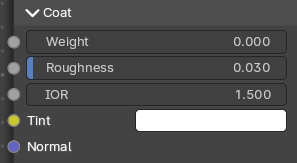
Extra white specular layer on top of others. This is useful for materials like car paint and the like.
| Entry | What it does |
|---|---|
| Weight | Controls the intensity of the coat layer. Both, the reflection and the tinting. For physically based materials this value should be zero. |
| Roughness | Roughness of clear coat specular. |
| IOR | The index of refraction of the coat layer. It affects the reflectivity and the falloff of coat tinting. |
| Tint | The coat color. Saturation increases at shallower angles as the light travels farther through the medium. |
| Normal | Controls the normals of the coat layer. |
Sheen subpanel
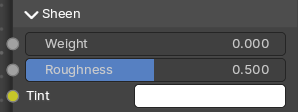
| Entry | What it does |
|---|---|
| Weight | Controls the intensity of the layer. |
| Roughness | Controls the roughness of the layer. |
| Tint | Mix between white and using base color for sheen reflection. |
Emission subpanel
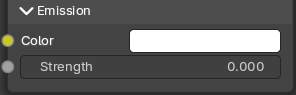
Light emission from the surface, like the Emission shader.
| Entry | What it does |
|---|---|
| Color | The emission color. |
| Emission Strength | The strength of the light emission. |
Thin Film subpanel
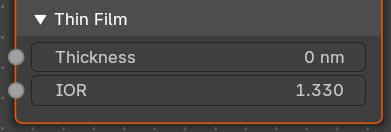
A thin film coating of a material with a normal angle of incidence.
Note: Useful for bubbles, oil floating on water and other similar effects.
| Entry | What it does |
|---|---|
| Thickness | The thickness of the thin film. |
| IOR | The index of refraction of the thin film layer. It affects the reflectivity and the falloff of thin film. |
Outputs
BSDF
Standard shader output.
Refraction BSDF
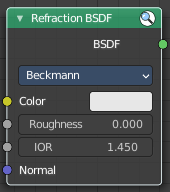
The Refraction BSDF is used to add glossy refraction with sharp or micro facet distribution, used for materials that transmit light. For best results this node should be considered as a building block and not be used on its own, but rather mixed with a glossy node using a Fresnel factor. Otherwise it will give quite dark results at the edges for glossy refraction.
Inputs
| Entry | What it does |
|---|---|
| Color | Color of the surface, or physically speaking, the probability that light is refracted for each wavelength. |
| Roughness | Influences sharpness of the refraction; perfectly sharp at 0.0 and smoother with higher values. |
| Normal | Normal used for shading; if nothing is connected the default shading normal is used. |
Properties
Distribution
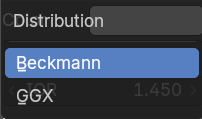
Micro facet distribution to use. Sharp results in perfectly sharp refraction, while Beckmann and GGX can use the Roughness input for blurry refraction.
Outputs
BSDF
Standard shader output.
Specular BSDF
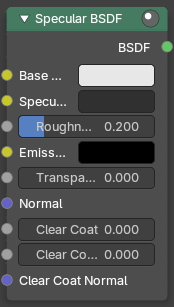
Eevee Only
The Specular BSDF combines multiple shader layers into a single easy to use node.
It is similar to the Principled BSDF node but uses the specular workflow instead of the metallic. It has far fewer parameters and supports less features. Both might be merged into one node in the future.
The specular workflow functions by specifying the facing (along normal) reflection color. The result may not be physically plausible because there is no energy conservation.
Inputs
| Entry | What it does |
|---|---|
| Base Color | Diffuse surface color. For conductor materials (metals) it should be black. |
| Specular Color | Amount of specular reflection. Specifies facing (along normal) reflectivity. Conductor materials (metals) can have colored specular reflection. Hint. To compute this value for a realistic material with a known index of refraction, you may use this special case of the Fresnel formula: specular=((ior-1)/(ior+1))2 For example: water: ior = 1.33, specular = 0.25 glass: ior = 1.5, specular = 0.5 diamond: ior = 2.417, specular = 2.15 |
| Roughness | Specifies micro facet roughness of the surface for diffuse and specular reflection. Hint. When converting from the older Glossy BSDF node, use the square root of the original value. |
| Emissive Color | Color of the emitted light. This light is added to the BSDF result. |
| Transparency | Transparency factor. This is the inverse of the alpha channel (1 - alpha) you find in an image. Use an Invert node to convert alpha to transparency. This will only have an effect if the material uses a blend mode other than opaque. |
| Normal | Controls the normals of the base layers. |
| Clear coat | Extra white specular layer on top of others. This is useful for materials like car paint and the like. |
| Clear coat Roughness | Roughness of clear coat specular. |
| Clear coat Normal | Controls the normals of the Clear coat layer. |
Outputs
BSDF
Standard shader output.
Subsurface Scattering
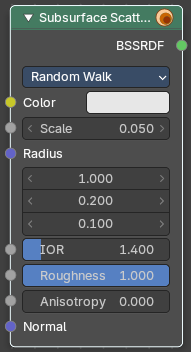
The Subsurface Scattering node is used to add simple subsurface multiple scattering, for materials such as skin, wax, marble, milk and others. For these materials, rather than light being reflect directly off the surface, it will penetrate the surface and bounce around internally before getting absorbed or leaving the surface at a nearby point.
How far the color scatters on average can be configured per RGB color channel. For example, for skin, red colors scatter further, which gives distinctive red-colored shadows, and a soft appearance.
Properties
Method
Method for rendering subsurface scattering.
Christensen-Burley
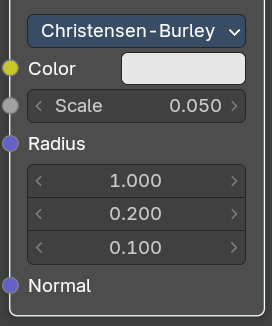
Color
Color of the surface, or physically speaking, the probability that light is reflected for each wavelength.
Scale
Global scale factor for the scattering radius.
Radius
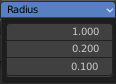
Average distance that light scatters below the surface. Higher radius gives a softer appearance, as light bleeds into shadows and through the object. The scattering distance is specified separately for the RGB channels, to render materials such as skin where red light scatters deeper. The X, Y and Z values are mapped to the R, G and B values, respectively.
Normal
Normal used for shading; if nothing is connected the default shading normal is used.
Random Walk
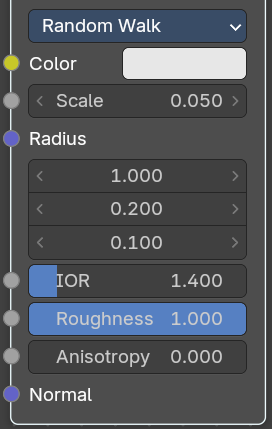
| Entry | What it does |
|---|---|
| Color | Color of the surface, or physically speaking, the probability that light is reflected for each wavelength. |
| Scale | Global scale factor for the scattering radius. |
| Radius | Average distance that light scatters below the surface. Higher radius gives a softer appearance, as light bleeds into shadows and through the object. The scattering distance is specified separately for the RGB channels, to render materials such as skin where red light scatters deeper. The X, Y and Z values are mapped to the R, G and B values, respectively. |
IOR
Refraction value.
| Entry | What it does |
|---|---|
| Roughness | The roughness of the subsurface scattering. It controls how light reflects off thesurfacebefore and after it scatters inside. |
| Anisotropy | The anisotropy level of the subsurface scattering. Anisotropy controls the the preferred direction in which light scatters**inside **the material rather than spreading evenly in all directions. |
Normal
Normal used for shading; if nothing is connected the default shading normal is used.
Random Walk (Skin)
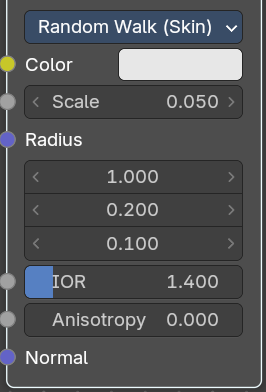
| Entry | What it does |
|---|---|
| Color | Color of the surface, or physically speaking, the probability that light is reflected for each wavelength. |
| Scale | Global scale factor for the scattering radius. |
| Radius | Average distance that light scatters below the surface. Higher radius gives a softer appearance, as light bleeds into shadows and through the object. The scattering distance is specified separately for the RGB channels, to render materials such as skin where red light scatters deeper. The X, Y and Z values are mapped to the R, G and B values, respectively. |
| Entry | What it does |
|---|---|
| IOR | Refraction value. · Anisotropy: The anisotropy level of the subsurface scattering. Anisotropy controls the the preferred direction in which light scattersinsidethe material rather than spreading evenly in all directions. |
| Normal | Normal used for shading; if nothing is connected the default shading normal is used. |
Outputs
BSSRDF
BSSRDF shader output.
Translucent BSDF
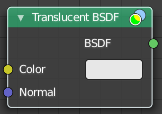
The Translucent BSDF is used to add Lambertian diffuse transmission.
| Entry | What it does |
|---|---|
| Inputs | Color: Color of the surface, or physically speaking, the probability that light is transmitted for each wavelength. · Normal: Normal used for shading; if nothing is connected the default shading normal is used. |
| Outputs | BSDF output: Standard shader output. |
Transparent BSDF
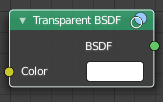
The Transparent BSDF is used to add transparency without refraction, passing straight through the surface, as if there were no geometry there. Useful with alpha maps, for example. This shader affects light paths somewhat differently than other BSDFs. Note that only pure white transparent shaders are completely transparent.
| Entry | What it does |
|---|---|
| Inputs | Color: Color of the surface, or physically speaking, the probability for each wavelength that light is blocked or passes straight through the surface. |
| Outputs | BSDF: Standard shader output. |
Principled Volume
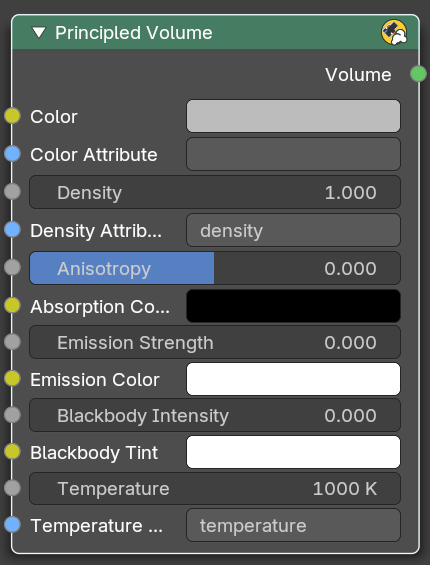
The Principled Volume shader combines all volume shading components into a single easy to use node. Volumes like smoke and fire can be rendered with a single shader node, which includes scattering, absorption and blackbody emission.
Inputs
| Entry | What it does |
|---|---|
| Color | Volume scattering color. |
| Color Attribute | Volume grid for coloring the volume. Use “color” for smoke simulations. |
| Density | Density of the volume. |
| Density Attribute | Volume grid to define the density, typically “density”. |
| Anisotropy | Backward or forward scattering direction. |
| Absorption Color | Volume shadow color tint. |
| Emission Strength | Amount of light to emit. |
| Emission Color | Emission color tint. |
| Blackbody Intensity | Blackbody emission for fire. Set to 1 for physically accurate intensity. |
| Blackbody Tint | Color tint for blackbody emission. |
| Temperature | Temperature in kelvin for blackbody emission, higher values emit more. |
| Temperature Attribute | Volume grid attribute to define the temperature. |
Outputs
Volume
Standard shader output.
Volume Absorption
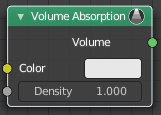
The Volume Absorption node allows light to be absorbed as it passes through the volume. Typical usage for this node would be water and colored glass.
| Entry | What it does |
|---|---|
| Inputs | Color: Color of the volume. · Density: The density of the absorption effect. |
| Outputs | Volume: The Volume Shader. |
Volume Scatter
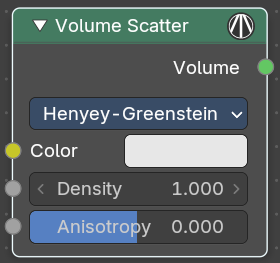
The Volume Scatter node allows light to be scattered as it passes through the volume. Typical usage would be to add fog to a scene. It can also be used with the Volume Absorption node to create smoke.
Properties
Phase
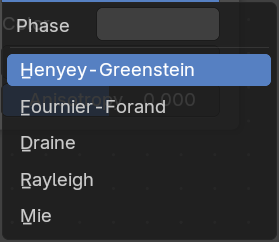
Phase function for the scattered light.
Henyey-Greenstein: Common for biological tissues and fog.
Fournier-Forand: Suitable for underwater scattering.
Draine: Models interstellar dust.
Rayleigh: For small particles like atmospheric haze.
Mie: For large particles like clouds or mist.
Henyey-Greenstein
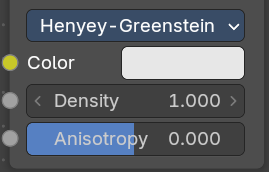
| Entry | What it does |
|---|---|
| Color | Color of the volume. |
| Density | The density of the scatter effect. |
| Anisotropy | Controls the look of the scatter effect depending on the direction of the light passing through it. |
Fournier-Forand
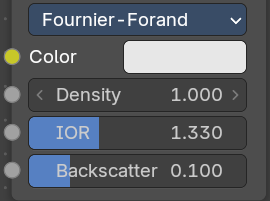
| Entry | What it does |
|---|---|
| Color | Color of the volume. |
| Density | The density of the scatter effect. |
| IOR | The refraction of the scatterning particles |
| Backscatter | Fraction of light that is scattered backwards. |
Draine
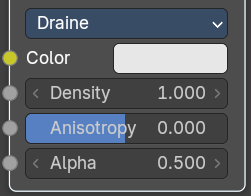
| Entry | What it does |
|---|---|
| Color | Color of the volume. |
| Density | The density of the scatter effect. |
| Anisotropy | Controls the look of the scatter effect depending on the direction of the light passing through it. |
| Alpha | Fraction of light that is scattered backwards. |
Rayleigh
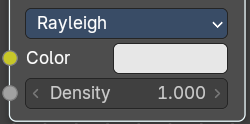
| Entry | What it does |
|---|---|
| Color | Color of the volume. |
| Density | The density of the scatter effect. |
Mie
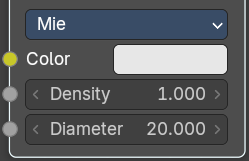
| Entry | What it does |
|---|---|
| Color | Color of the volume. |
| Density | The density of the scatter effect. |
| Diameter | Diameter of the water droplets in micrometers. |
Output
Volume
The Volume Shader output must be plugged into the Volume Input of the Material or World Output node.
Volume Coefficients
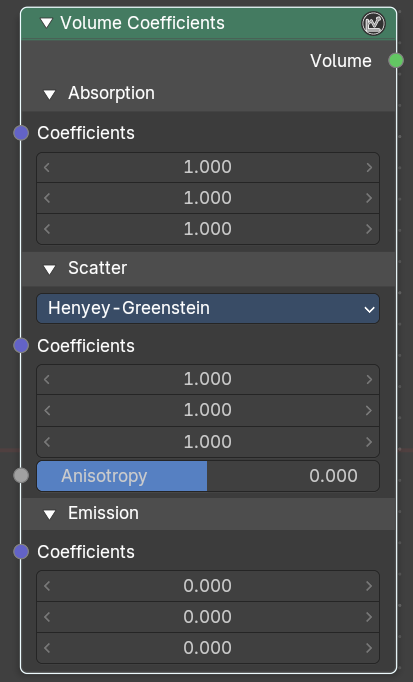
The Volume Coefficients node models how light interacts with volumetric materials by defining three key physical processes: Absorption, Scattering, and Emission. This node provides fine-grained control over how light is absorbed, redirected, and emitted as it travels through a volume—ideal for simulating effects like smoke, fog, underwater environments, or glowing gases.
Inputs
Absorbtion subpanel
Coefficients
A vector input representing the probability per unit distance that light is absorbed in each color channel (R, G, B) of a vector.
Note: Higher values result in* darker, denser volumes*.
Scatter subpanel
The density of the scatter effect.
Phase
Dropdown to select the scattering phase function.
Henyey-Greenstein: Common for biological tissues and fog.
Fournier-Forand: Suitable for underwater scattering.
Draine: Models interstellar dust.
Rayleigh: For small particles like atmospheric haze.
Mie: For large particles like clouds or mist.
Henyey-Greenstein
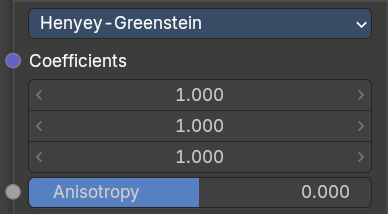
| Entry | What it does |
|---|---|
| Coefficients | A vector input defining the likelihood of light scattering per unit distance in each color channel. Controls how much light is redirected rather than absorbed. |
| Anisotropy | A float value controlling the directionality of scattering. |
Fournier-Forand
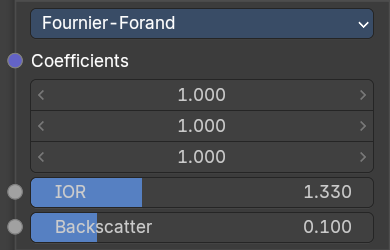
| Entry | What it does |
|---|---|
| Coefficients | A vector input defining the likelihood of light scattering per unit distance in each color channel. Controls how much light is redirected rather than absorbed. |
| IOR | The refraction of the scatterning particles |
| Backscatter | Fraction of light that is scattered backwards. |
Draine
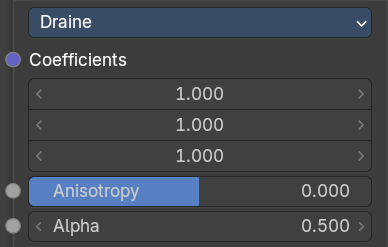
| Entry | What it does |
|---|---|
| Coefficients | A vector input defining the likelihood of light scattering per unit distance in each color channel. Controls how much light is redirected rather than absorbed. |
| Density | The density of the scatter effect. |
| Anisotropy | Controls the look of the scatter effect depending on the direction of the light passing through it. |
Raileigh
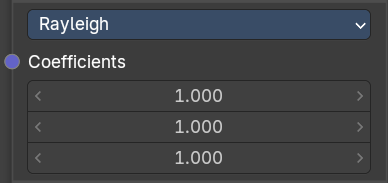
Coefficients
A vector input defining the likelihood of light scattering per unit distance in each color channel. Controls how much light is redirected rather than absorbed.
Mie
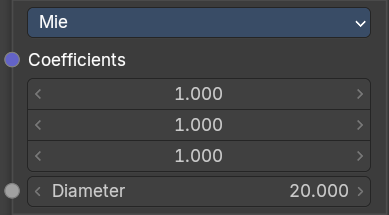
| Entry | What it does |
|---|---|
| Coefficients | A vector input defining the likelihood of light scattering per unit distance in each color channel. Controls how much light is redirected rather than absorbed. |
| Diameter | Diameter of the water droplets in micrometers. |
Emission subpanel
Coefficients
Controls the look of the scatter effect depending on the direction of the light passing through it. Simulates glowing volumes like fire or plasma.
Output
Volume
The Volume Shader output must be plugged into the Volume Input of the Material or World Output node.
Cycles / Workbench
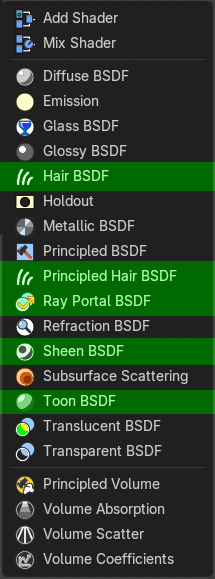
Hair BSDF
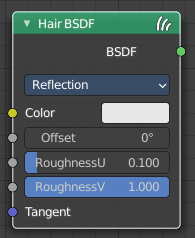
Cycles Only
The Hair BSDF node is used to add shading for Hair.
Inputs
| Entry | What it does |
|---|---|
| Color | Color of the hair. |
| Offset | Controls the way the light is rotated (angular shift) for the reflection/transmission. |
| Roughness U/V | Controls the roughness in the direction light is skewed, and perpendicular to it. |
| Tangent | Input tangent. |
Properties
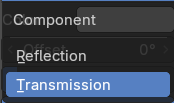
| Entry | What it does |
|---|---|
| Component | There are two components that can be used to control the look of the hair. Usually you are going to want each of these and use a Mix Node. |
| Reflection | The light that bounces off the surface of the hair. |
| Transmission | The light that passes through the hair and comes out the other side. |
Outputs
BSDF
Standard shader output.
Principled Hair BSDF
Cycles Only
The Principled Hair BSDF is a physically-based, easy-to-use shader for rendering hair and fur.
Properties
Scattering Mode
Chiang Model versus Huang Model
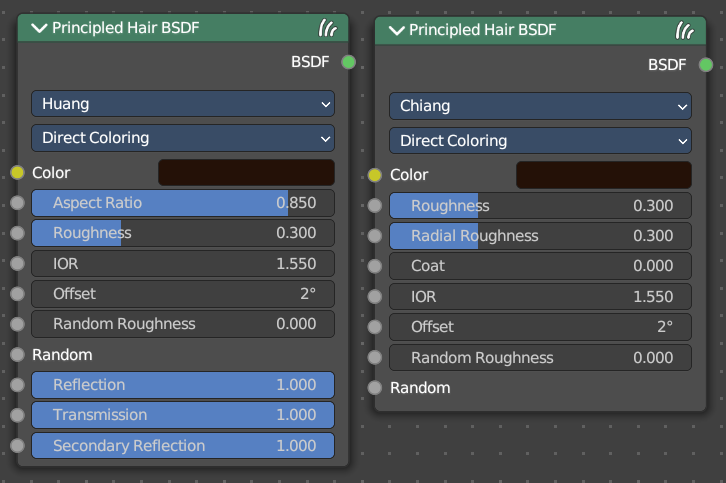
There are two scattering models available. Chiang and Huang. Chiang is the older model, with a less accurate result. Huang the newer model. The available options differs from model to model.
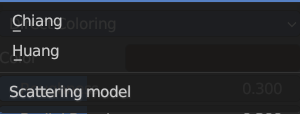
Color Parametrization
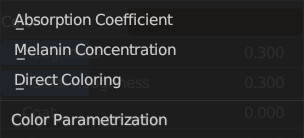
The shader provides three different ways, or parametrizations, to color the hair strands. Direct coloring, Melanin concentration and Absorption coefficient. They have some different settings and inputs.
Inputs
Huang - Absorption coefficient
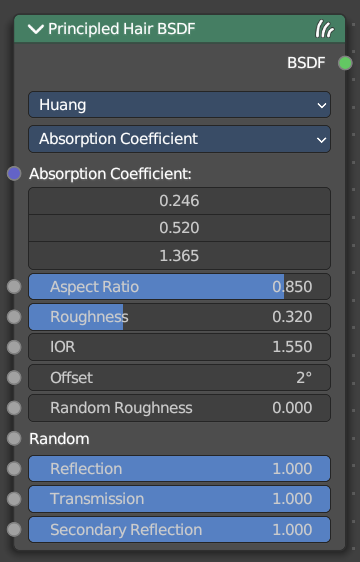
Specifies the attenuation coefficient sa, as applied by the Beer-Lambert law. This mode is intended mainly for technical users who want to use coefficients from the literature without any sort of conversion.
| Entry | What it does |
|---|---|
| Absorption Coefficient | Specifies the light absorption per unit length as the light passes through the value. A higher value leads to a darker color. The absorption coefficient is a vector 3. |
| Aspect Ratio | For elliptical hair cross-section the aspect ratio is the ratio of the minor axis to the major axis. The major axis is alighed with the curve normal. Recommended values are 0.8 to 1 for asian hair, 0.654 to 0.9 for caucasian hair and 0.5 to 0.65 for african hair. Set it to 1 for a circular cross section. |
| Roughness | The hair roughness. A lower value leads to a metallic look. |
| IOR | Refraction coefficient. The default value of 1.550 is the refraction coefficient of melanin. |
| Offset | The tilt angle of the cuticle scales. That'st the outermost part of the hair. They are always tilted towards the hair root. Human hair has a value between 2 and 4. |
| Random Roughness | Adds a random roughness to each strand. |
| Random | Add a random input value. |
| Reflection | Optional factor for modulating the first light bounce off the hair surface. The color of this component is always white. Keep it 1.0 for physical correctness. |
| Transmission | Optional factor for modulating the transmission component. The color of this component is always white. Keep it 1.0 for physical correctness. |
| Secondary Reflection | Optional factor for modulating the component which is transmitted into the hair, reflected off the backside of the hair and then transmitted out of the hair. This component is oriented approximately around the incoming direction, and picks up the color of the pigment inside the hair. Keep this 1.0 for physical correctness. |
Huang - Melanin concentration
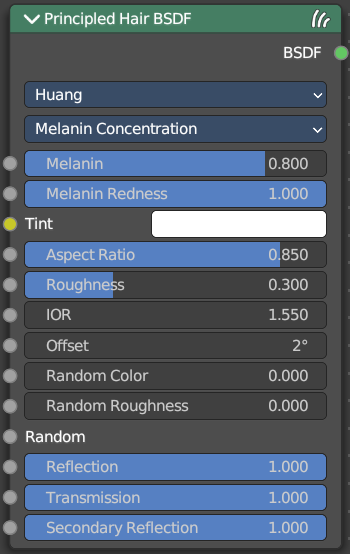
This mode defines the color as the quantity and ratio of the pigments which are commonly found in hair and fur, eumelanin (prevalent in brown-black hair) and pheomelanin (red hair). The quantity is specified in the Melanin input, and the ratio between them in Melanin Redness. Increasing concentrations darken the hair (the following are with Melanin Redness 1):
White (Melanin 0), Blonde (Melanin 0.25), Reddish (Melanin 0.5), Brown (Melanin 0.75), Black (Melanin 1)
Additionally, the Tint inputs allows to dye the hair with the desired color.
| Entry | What it does |
|---|---|
| Melanin | Absolute quantity of pigment. Range [0,1] equivalent to [0%,100%]. Hint. This is a linear mapping to the underlying exponential function: melanin_qty=-ln(max(1.0-Melanin,0.0001)) |
| Melanin Redness | Ratio of pheomelanin to eumelanin. Range [0,1] equivalent to [0%,100%]. Hint. The ratio formula is: eumelanin=Melanin*(1.0-MelaninRedness), pheomelanin=Melanin*MelaninRedness. The resulting quantities are converted (after randomization, if specified) to absorption concentration via the following formula (section 6.1 of [EFHLA11], adjusted for the range [0,1]): sa=eumelanin*???0.5060.8411.653???+pheomelanin*???0.3430.7331.924??? |
| Tint | Color used for dyeing the hair after applying the melanin pigment. It is not subject to randomization. It can be disabled by setting the color to white. Hint. This is converted via the Color mapping above and added to the absorption coefficient of the melanin concentration. |
| IOR | Refraction coefficient. The default value of 1.550 is the refraction coefficient of melanin. |
| Offset | The tilt angle of the cuticle scales. That'st the outermost part of the hair. They are always tilted towards the hair root. Human hair has a value between 2 and 4. |
| Random Color | For each strand, vary the melanin concentration by RandomFactor. Range [0,1] equivalent to [0%,100%] of the initial melanin concentration. Hint. The melanin concentration is multiplied by randomFactor, where randomFactor=1.0+2.0*(Random-0.5)*RandomColor. |
| Random Roughness | Adds a random roughness to each strand. |
| Reflection | Optional factor for modulating the first light bounce off the hair surface. The color of this component is always white. Keep it 1.0 for physical correctness. |
| Transmission | Optional factor for modulating the transmission component. The color of this component is always white. Keep it 1.0 for physical correctness. |
| Secondary Reflection | Optional factor for modulating the component which is transmitted into the hair, reflected off the backside of the hair and then transmitted out of the hair. This component is oriented approximately around the incoming direction, and picks up the color of the pigment inside the hair. Keep this 1.0 for physical correctness. |
Huang - Direct Coloring
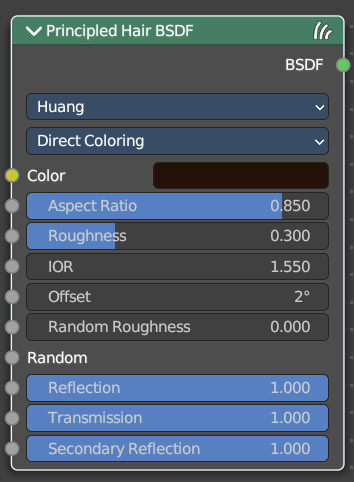
Choose the desired RGB color and the shader will approximate the necessary absorption coefficient (below).
| Entry | What it does |
|---|---|
| Aspect Ratio | For elliptical hair cross-section the aspect ratio is the ratio of the minor axis to the major axis. The major axis is alighed with the curve normal. Recommended values are 0.8 to 1 for asian hair, 0.654 to 0.9 for caucasian hair and 0.5 to 0.65 for african hair. Set it to 1 for a circular cross section. |
| Roughness | The hair roughness. A lower value leads to a metallic look. |
| IOR | Refraction coefficient. The default value of 1.550 is the refraction coefficient of melanin. |
| Offset | The tilt angle of the cuticle scales. That'st the outermost part of the hair. They are always tilted towards the hair root. Human hair has a value between 2 and 4. |
| Random Roughness | Adds a random roughness to each strand. |
| Reflection | Optional factor for modulating the first light bounce off the hair surface. The color of this component is always white. Keep it 1.0 for physical correctness. |
| Transmission | Optional factor for modulating the transmission component. The color of this component is always white. Keep it 1.0 for physical correctness. |
| Secondary Reflection | Optional factor for modulating the component which is transmitted into the hair, reflected off the backside of the hair and then transmitted out of the hair. This component is oriented approximately around the incoming direction, and picks up the color of the pigment inside the hair. Keep this 1.0 for physical correctness. |
Chiang - Absorption coefficient
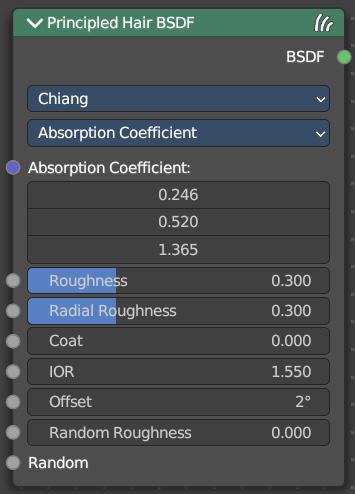
Specifies the attenuation coefficient sa, as applied by the Beer-Lambert law. This mode is intended mainly for technical users who want to use coefficients from the literature without any sort of conversion.
| Entry | What it does |
|---|---|
| Absorption Coefficient | Specifies the light absorption per unit length as the light passes through the value. A higher value leads to a darker color. The absorption coefficient is a vector 3. |
| Roughness | The hair roughness. A lower value leads to a metallic look. |
| Radial Roughness | Specify how much the glints are smoothed in the direction of the hair tangent. Too low values will concentrate the glint; while setting it too high will spread the light across the width of the strand. Hint. Mathematically, this parameter is mapped to the logistic distribution’s scale factor s (section 4.1 of [CBTB16]). |
| Coat | Simulate a shiny coat by reducing the roughness to the given factor only for the first light bounce (diffuse). Range [0, 1] is equivalent to a reduction of [0%, 100%] of the original roughness.") |
| IOR | Refraction coefficient. The default value of 1.550 is the refraction coefficient of melanin. |
| Offset | The tilt angle of the cuticle scales. That'st the outermost part of the hair. They are always tilted towards the hair root. Human hair has a value between 2 and 4. |
| Random Roughness | Adds a random roughness to each strand. |
| Random | Add a random value. |
Chiang - Melanin concentration
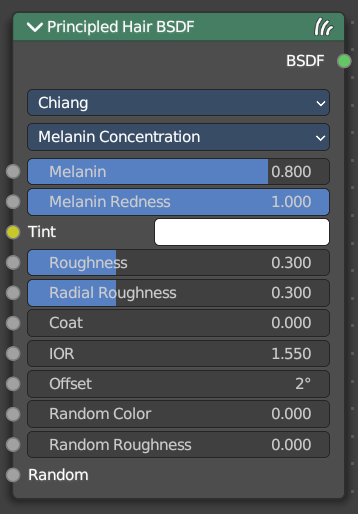
This mode defines the color as the quantity and ratio of the pigments which are commonly found in hair and fur, eumelanin (prevalent in brown-black hair) and pheomelanin (red hair). The quantity is specified in the Melanin input, and the ratio between them in Melanin Redness. Increasing concentrations darken the hair (the following are with Melanin Redness 1):
White (Melanin 0), Blonde (Melanin 0.25), Reddish (Melanin 0.5), Brown (Melanin 0.75), Black (Melanin 1)
Additionally, the Tint inputs allows to dye the hair with the desired color.
| Entry | What it does |
|---|---|
| Melanin | Absolute quantity of pigment. Range [0,1] equivalent to [0%,100%]. Hint. This is a linear mapping to the underlying exponential function: melanin_qty=-ln(max(1.0-Melanin,0.0001)) |
| Melanin Redness | Ratio of pheomelanin to eumelanin. Range [0,1] equivalent to [0%,100%]. Hint. The ratio formula is: eumelanin=Melanin*(1.0-MelaninRedness), pheomelanin=Melanin*MelaninRedness. The resulting quantities are converted (after randomization, if specified) to absorption concentration via the following formula (section 6.1 of [EFHLA11], adjusted for the range [0,1]): sa=eumelanin*???0.5060.8411.653???+pheomelanin*???0.3430.7331.924??? |
| Tint | Color used for dyeing the hair after applying the melanin pigment. It is not subject to randomization. It can be disabled by setting the color to white. Hint. This is converted via the Color mapping above and added to the absorption coefficient of the melanin concentration. |
| Roughness | The hair roughness. A lower value leads to a metallic look. |
| Radial Roughness | Specify how much the glints are smoothed in the direction of the hair tangent. Too low values will concentrate the glint; while setting it too high will spread the light across the width of the strand. Hint. Mathematically, this parameter is mapped to the logistic distribution’s scale factor s (section 4.1 of [CBTB16]). |
| Coat | Simulate a shiny coat by reducing the roughness to the given factor only for the first light bounce (diffuse). Range [0, 1] is equivalent to a reduction of [0%, 100%] of the original roughness.") |
| IOR | Refraction coefficient. The default value of 1.550 is the refraction coefficient of melanin. |
| Offset | The tilt angle of the cuticle scales. That'st the outermost part of the hair. They are always tilted towards the hair root. Human hair has a value between 2 and 4. |
| Random Color | For each strand, vary the melanin concentration by RandomFactor. Range [0,1] equivalent to [0%,100%] of the initial melanin concentration. Hint. The melanin concentration is multiplied by randomFactor, where randomFactor=1.0+2.0*(Random-0.5)*RandomColor. |
| Random Roughness | Adds a random roughness to each strand. |
Chiang - Direct Coloring
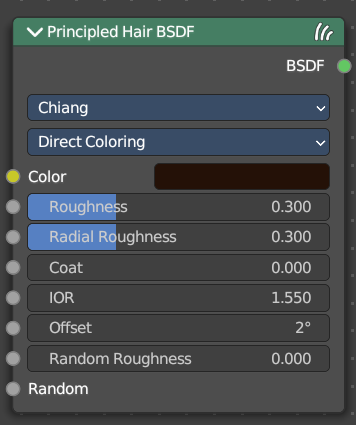
Choose the desired RGB color and the shader will approximate the necessary absorption coefficient (below).
| Entry | What it does |
|---|---|
| Color | The RGB color of the strand. Only used in Direct coloring. Hint. The chosen color is converted to an absorption coefficient with the following formula (section 4.2 of [CBTB16]): sa=ln(Color)(5.969-0.215ßN+2.532ß2N-10.73ß3N+5.574ß4N+0.245ß5N)2 where ßN is the radial roughness of the hair after applying randomization (if specified). |
| Roughness | The hair roughness. A lower value leads to a metallic look. |
| Radial Roughness | Add an extra radial roughness. |
| Coat | Simulate a shiny coat of fur, by reducing the Roughness to the given factor only for the first light bounce (diffuse). Range [0,1] equivalent to a reduction of [0%,100%] of the original Roughness. |
| IOR | Index of refraction (IOR) defining how much the ray changes direction. At 1.0 rays pass straight through like in a transparent material; higher values give more refraction. Default value is 1.55. |
| Offset | Tilts the glint of the hair by increasing the angle of the scales of the hair’s cuticle with respect to the hair shaft. Human hair usually has low values. |
| Random Roughness | For each strand, vary both Roughness values by RandomFactor. Range [0,1] equivalent to [0%,100%] of the initial roughness values. Hint. The applied formula is the same one as for Random Color. |
Outputs
BSDF
Standard shader output.
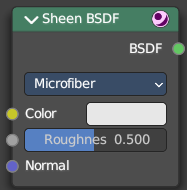
Sheen BSDF
Cycles Only
The Sheen BSDF is used to add reflection to materials such as cloth. It is meant to be used together with other shaders (such as a Diffuse Shader) and is not particularly useful on its own.
Inputs
| Entry | What it does |
|---|---|
| Color | Color of the surface, or physically speaking, the probability that light is reflected for each wavelength. |
| Sigma | Variance of the normal distribution, controlling the sharpness of the peak. It can be thought of as a kind of roughness. |
| Normal | Normal used for shading; if nothing is connected the default shading normal is used. |
Properties
Distribution
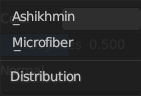
The distribution algorithm. Akishikmin is the legacy model. Microfiber the modern approach.
Outputs
BSDF
Standard shader output.
Toon BSDF
Cycles Only
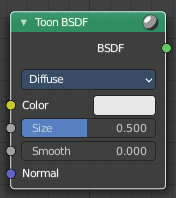
The Toon BSDF is used to create Diffuse and Glossy materials with cartoon light effects.
Inputs
| Entry | What it does |
|---|---|
| Color | Color of the surface, or physically speaking, the probability that light is reflected for each wavelength. |
| Size | Parameter between 0.0 and 1.0 that gives an angle of reflection between 0° and 90°. |
| Smooth | This value specifies an angle over which a smooth transition from full to no reflection happens. |
| Normal | Normal used for shading; if nothing is connected the default shading normal is used. |
Properties
Component
| Entry | What it does |
|---|---|
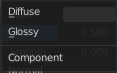
| Diffuse | Use shading based on the Diffuse BSDF. |
| Glossy | Use shading based on the Glossy BSDF for specular reflection. |
Outputs
BSDF
Standard shader output.
World
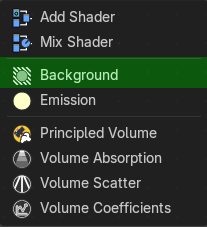
Background
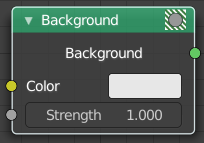
Shader Type World
The Background shader node is used to add background light emission.
| Entry | What it does |
|---|---|
| Inputs | Color: Color of the emitted light. · Strength: Strength of the emitted light. |
| Outputs | Background: Standard shader output. |