

































































Collision panel
Collision sets the mesh object as a static collider. Particles, Soft Bodies and Cloth objects may collide with mesh objects. Boids try to avoid Collision objects.
Collision
Collision sets the mesh object as a static collider. Particles, Soft Bodies and Cloth objects may collide with mesh objects. Boids try to avoid Collision objects.
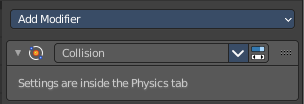
Once you add a collision to a mesh a modifier gets created in the modifier properties tab. Here you can add other modifiers that may interact with the collision. But the collision settings are just accessible from the physics tab.
Hints!
You may limit the effect on particles to a group of objects. This can be done in the Field Weights panel in the particles tab of the object with the particles.
Make sure that the normals of the mesh surface are facing towards the particles/points for correct deflection.
Hair particles react directly to force fields, so if you use a force field with a short range you do not need necessarily collision.
Hair particles avoid their emitting mesh if you edit them in Particle Edit Mode. So you can at least model the hair with collision.
Hair particles ignore deflecting objects. But you can animate them as soft bodies which take deflection into account.
Soft body collisions can make problems if one of the objects move too fast. Then the soft body will penetrate the mesh.
If you change the deflection settings for an object you have to recalculate the particle, soft body or cloth system by Delete Bake, this is not done automatically.
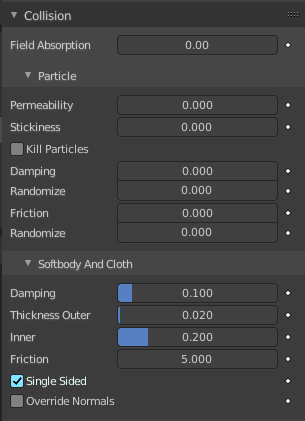
Field Absorption
A deflector can also deflect effectors. You can specify some collision/deflector objects which deflect a specific portion of the effector force using the Field Absorption value. 100% absorption results in no force getting through the collision/deflector object at all. If you have three collision object behind each other with e.g. 10%, 43% and 3%, the absorption ends up at around 50% 100×(1-0.1)×(1-0.43)×(1-0.03).
Particle subpanel
| Entry | What it does |
|---|---|
| Permeability | Fraction of particles passing through the mesh. |
| Stickiness | How much particles stick to the object. |
| Kill Particles | Deletes Particles upon impact. |
| Damping | Damping during a collision (independent of the velocity of the particles). |
| Randomize | Random variation of damping. |
| Friction | Friction during movements along the surface. |
| Randomize | Random variation of friction. |
Soft Body and Cloth subpanel
It is important to note that this collision panel is used to tell all simulations that this object is to participate in colliding/deflecting other objects on a shared layer (particles, soft bodies, and cloth).
Note: The object’s shape deforms the cloth, so the cloth simulation must be inputted the “true” shape of that mesh object at that frame. This true shape is the basis shape as modified by shape keys or armatures. Therefore, the Collision Modifier must be after any of those. The image to the right shows the Modifiers panel for the Character mesh object (not the cloth object).
| Entry | What it does |
|---|---|
| Damping | Damping during a collision. The amount of bounce that the surfaces will have. 0.0 - No damping, soft bodies will have a maximum bounciness. 1.0 - Maximum damping, soft bodies will not bounce at all. |
| Thickness Outer | Size of the outer collision zone. Adds a padding distance to the outside of each face, to help to prevent intersections. The soft body will come to rest at this distance away from the face of the colliding object. Outside and inside is defined by the face normal. |
| Inner | Size of the inner collision zone (padding distance). Adds a padding distance to the inside of each face, to help to prevent intersections. The soft body will come to rest at this distance away from the face of the colliding object. Outside and inside is defined by the face normal. |
| Friction | A coefficient for how slippery the cloth is when it collides with itself. For example, silk has a lower coefficient of friction than cotton. |
| Single Sided | When enabled, cloth collisions are only performed on the normal side of the collider plane. |
| Override Normals | When enabled, cloth collision impulses act in the direction of the collider normals. |