

































































Hair - Render panel
Hair particles can be rendered as a Path. And it can render Objects or collections as the hair particles.
Render Panel
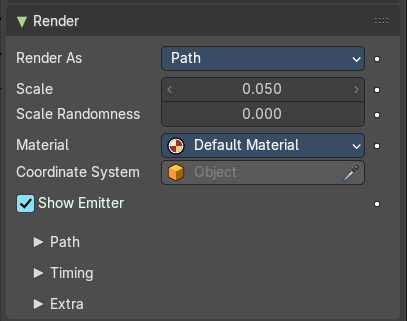
Hair particles can be rendered as a Path. And it can render Objects or collections as the hair particles.
Render As
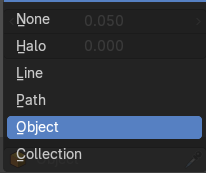
Render the particles with different methods.
All render methods
Show Emitter
Render the particle emitting mesh. This does not affect viewport rendering!
Render as None

Don't render the particles.
Render as Halo + Line
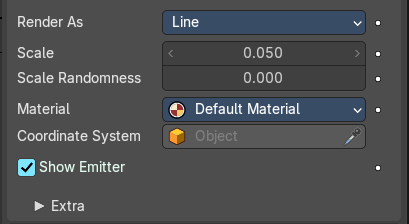
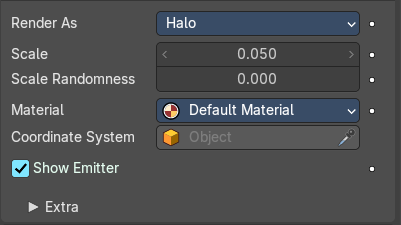
Render the hair particles as a halo.
| Entry | What it does |
|---|---|
| Scale | The size of the particles. |
| Scale Randomness | Give the particle size a random variation. |
| Material | Set which of the object’s materials is used to shade the particles. |
Coordinates System
Use a different object’s coordinates to determine the birth of particles.
Extra sub tab
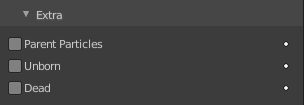
| Entry | What it does |
|---|---|
| Parents Particles | Render also parent particles if child particles are used. Children have a lot of different deformation options, so the straight parents would stand between their curly children. So by default Parents are not rendered if you activate Children. See Children. |
| Unborn | Render particles before they are born. |
| Dead | Render particles after they have died. This is very useful if particles die in a collision Die on hit, so you can cover objects with particles. |
Render as Path
Render the hair particles as paths.
| Entry | What it does |
|---|---|
| Scale | The size of the particles. |
| Scale Randomness | Give the particle size a random variation. |
| Material | Set which of the object’s materials is used to shade the particles. |
| Coordinates System | Use a different object’s coordinates to determine the birth of particles. |
Path subpanel
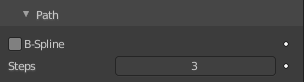
B-Spline
Interpolate hair using B-splines. This may be an option for you if you want to use low Render values. You loose a bit of control but gain smoother paths.
Steps
Set the number of subdivisions of the rendered paths (the value is a power of 2). You should set this value carefully, because if you increase the render value by two you need four times more memory to render. Also the rendering is faster if you use low render values (sometimes drastically). But how low you can go with this value depends on the waviness of the hair (the value is a power of 2). This means 0 steps give 1 subdivision, 1 give 2 subdivisions, 2 –> 4, 3 –> 8, 4 –> 16, … n –> n2.
Timing subpanel
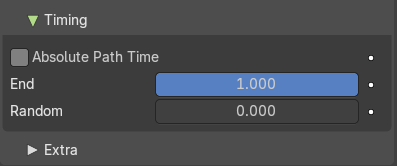
| Entry | What it does |
|---|---|
| Absolute Path Time | Path timing is in absolute frames. |
| End | End time of the path. |
| Random | Give the path length a random variation. |
Extra subpanel
| Entry | What it does |
|---|---|
| Parents Particles | Render also parent particles if child particles are used. Children have a lot of different deformation options, so the straight parents would stand between their curly children. So by default Parents are not rendered if you activate Children. See Children. |
| Unborn | Render particles before they are born. |
| Dead | Render particles after they have died. This is very useful if particles die in a collision Die on hit, so you can cover objects with particles. |
Render as Object
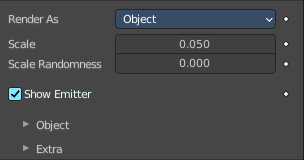
Render collections instead of the paths of the hair particles.
| Entry | What it does |
|---|---|
| Scale | The scale factor of the object. |
| Scale randomness | Give the particle size a randomness. |
Object Sub tab
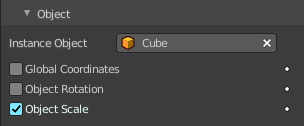
Choose the object to render instead of the path.
| Entry | What it does |
|---|---|
| Instance Object | Pick the object that you want to use as the particle. |
| Global Coordinates | Use the global coordinates of the object for duplication. This sets the particles to the position of the chosen object. |
| Object Rotation | Use the rotation of the object for duplication. |
| Object Scale | Use the scale of the object for duplication. |
Extra sub tab
| Entry | What it does |
|---|---|
| Parents Particles | Render also parent particles if child particles are used. Children have a lot of different deformation options, so the straight parents would stand between their curly children. So by default Parents are not rendered if you activate Children. See Children. |
| Unborn | Render particles before they are born. |
| Dead | Render particles after they have died. This is very useful if particles die in a collision Die on hit, so you can cover objects with particles. |
Render as Collection
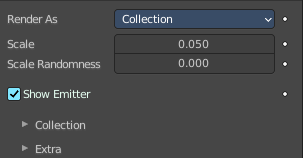
Render the content of a collection instead of the paths of the hair particles.
| Entry | What it does |
|---|---|
| Scale | The scale factor of the object. |
| Scale randomness | Give the particle size a randomness. |
Collection Sub tab
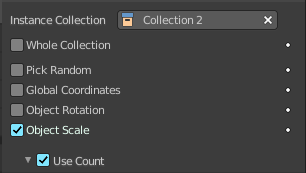
Choose the object to render instead of the path.
| Entry | What it does |
|---|---|
| Instance Collection | Pick the collection that you want to use as the particle. |
| Whole collection | Use the whole collection at once. |
| Pick Random | Pick objects from the collection randomly. |
| Global Coordinates | Use the global coordinates of the object for duplication. This sets the particles to the position of the chosen object. |
| Object Rotation | Use the rotation of the object for duplication. |
| Object Scale | Use the scale of the object for duplication. |
Use Count
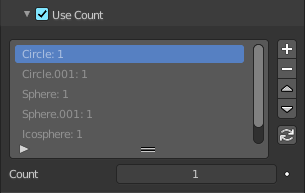
Use objects multiple times in the collection.
Active Dupli Object Index list
The list with the objects from the collection. The number behind the object tells you how often this object is used in the particles, relative to the other objects.
Drag Handler

The two vertical lines at the end is a handler with which you can expand the list.
Search Field

You can expand a search field at the bottom of the list. Type in your term and hit enter to filter for your term.
| Entry | What it does |
|---|---|
| Invert | Exclude the search term instead of searching for it. |
| Sort by Name | Sort the List by name. |
| Revert | Revert the list. The last list item becomes the first, and vice versa. |
| Entry | What it does |
|---|---|
| Copy Particle Dupliobject | Duplicate the current dupli object. |
| Remove Particle Dupliobject | Remove the selected dupli object. |
| Move Up / Down Dupli Object | Move the dupli object up or down in the list. |
| Refresh Dupli Objects | Refresh the list of dupli objects and their weights. |
| Count | The number of times this object is repeated with respect to other objects. |
Extra sub tab
| Entry | What it does |
|---|---|
| Parents Particles | Render also parent particles if child particles are used. Children have a lot of different deformation options, so the straight parents would stand between their curly children. So by default Parents are not rendered if you activate Children. See Children. |
| Unborn | Render particles before they are born. |
| Dead | Render particles after they have died. This is very useful if particles die in a collision Die on hit, so you can cover objects with particles. |