
































































Editors

Emitter - Vertex Groups panel
The Vertex groups panel allows you to specify vertex groups to use for several child particle settings. You can also negate the effect of each vertex group with the check boxes. You can affect the following attributes:
Vertex Groups panel
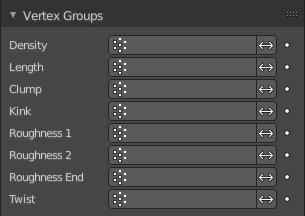
The Vertex groups panel allows you to specify vertex groups to use for several child particle settings. You can also negate the effect of each vertex group with the check boxes. You can affect the following attributes:
| Entry | What it does |
|---|---|
| Density | Defines the density of the particle distribution. |
| Length | Defines the length of the hair. |
| Clump | Controls the amount of clumping. The weight of 1.0 gives current Clump value, weight of 0.0 completely removes effect. |
| Kink | Controls the frequency of the children Kink. |
| Roughness 1 | Adjusts the Uniform roughness parameter. |
| Roughness 2 | Adjusts the Random roughness parameter. |
| Roughness End | Adjusts the Endpoint roughness parameter. |
| Twist | Vertex group to control the children’s Twist effect. Gives control over the direction of the twist, as well as the amount. The weight of 0.5 is neutral, i.e. there is no twist effect. |