
































































Editors

Emitter - Textures panel
Particles density can be controlled by textures. This panel allows you to set up the required textures. There can just be one active texture.
Textures panel
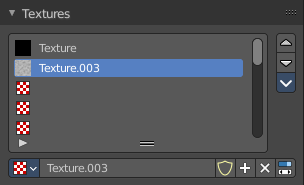
Particles density can be controlled by textures. This panel allows you to set up the required textures. There can just be one active texture.
| Entry | What it does |
|---|---|
| Texture Slot List | The list with the texture slots. You can rename the slots by double clicking at it. These slots are empty when you create them. You need to fill the slots with textures. This can be done in the Textures tab. |
| Move Texture Slot Up / Down | Move the texture slots up or down in the list. |
Texture Specials
| Entry | What it does |
|---|---|
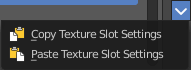
| Copy Texture Slot Settings | Copies the Texture Slot Settings. |
| Paste Texture Slot Settings | Pastes copied Texture Slot Settings. |
Image slot property
Texture Browser
A list of the textures in the scene. This list allows you to switch to other textures.
New

When nothing is loaded then you will see the New button to create a new image slot.
| Entry | What it does |
|---|---|
| Texture Edit Box | The name of the currently selected texture. A double left click allows you to rename it. |
| Fake User | Wit this button you assign a fake user to this selected image. Data, like images, that is not longer linked to anything else gets removed when you save and reload a scene. Bforartists has the concept of fake users to go around this behavior. An image with a fake user is in fact linked to something. And so it is not lost when you save and reload the scene. |
| New Texture | Create a new texture. |
| Remove | Delete the texture. |
| Change Context | Switch to the Texture tab where you can add and edit your texture for the texture slot. |