
































































Editors

Emitter - Rotation panel
Specify how the individual particles are rotated during their travel. To visualize the rotation of a particle you should choose visualization type Axis in the Visualization panel and increase the Display Size.
Rotation Panel
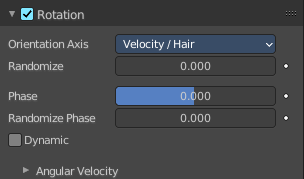
Specify how the individual particles are rotated during their travel. To visualize the rotation of a particle you should choose visualization type Axis in the Visualization panel and increase the Display Size.
Orientation Axis
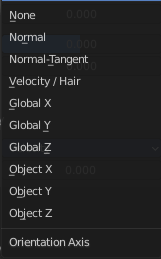
Sets the initial rotation of the particle by aligning the X axis in the direction of:
| Entry | What it does |
|---|---|
| None | The global X axis. |
| Normal | Orient to the emitter’s surface normal, the objects Y axis points outwards. |
| Normal-Tangent | As with normal, orient the Y axis to the surface normal. Also orient the X axis to the tangent for control over the objects rotation about the normal. requires UV coordinates, the UV rotation effects the objects orientation, currently uses the active UV map. This allow deformation without the objects rotating in relation to their surface. |
| Velocity | The particle’s initial velocity. |
| Global X, Y, Z | One of the global axes. |
| Object X, Y, Z | One of the emitter object axes. |
| Entry | What it does |
|---|---|
| Randomize | Randomizes rotation. |
| Phase | Initial rotation phase. |
| Randomize Phase | Adds a random variation to the Phase. |
| Dynamic | If Dynamic is enabled, only initializes particles to the chosen rotation and angular velocity and let the physics simulation handle the rest. Particles then change their angular velocity if they collide with other objects (like in the real world due to friction between the colliding surfaces). Otherwise the angular velocity is predetermined at all times (i.e. set rotation to dynamic/constant). |
Angular Velocity
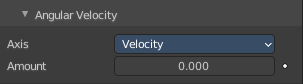
Axis
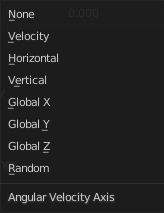
Which axis to use for the angular velocity.
Tip: If you use a Curve Guide do not turn on Dynamic. Curve Follow does also not work for particles.
Amount
The magnitude of angular velocity.