

































































Emitter - Physics panel
The movement of particles can be controlled and influenced in various ways. Physics is one of it.
Physics Panel
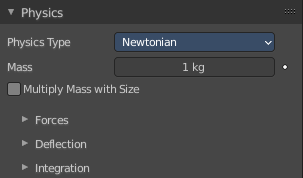
The movement of particles can be controlled and influenced in various ways. Physics is one of it.
Physics Type
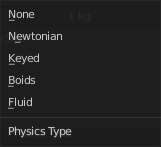
The kind of physics to influence the particles.
Physics Panel - Physics type None

The particles are created, and remains at their creation point.
This physics type does not have further settings.
Physics Panel - Physics type Newtonian
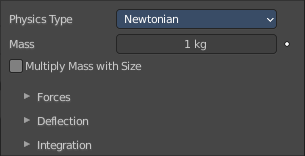
Particles are influenced by gravity.
| Entry | What it does |
|---|---|
| Mass | Specify the mass of the particles. |
| Multiply Mass with Size | Causes larger particles to have larger masses. |
Forces subpanel
| Entry | What it does |
|---|---|
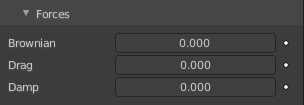
| Brownian | Specify the amount of Brownian motion. Brownian motion adds random motion to the particles based on a Brownian noise field. |
| Drag | A force that reduces particle velocity in relation to its speed and size (useful in order to simulate air drag or water drag). |
| Damp | Reduces particle velocity (deceleration, friction, dampening). |
Deflection subpanel
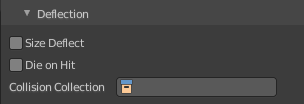
| Entry | What it does |
|---|---|
| Size Deflect | Use the particle size in deflections. |
| Die on Hit | Kill particle when it hits a deflector object. |
| Collision Collection | If set, particles collide with objects from the collection. |
Integration subpanel
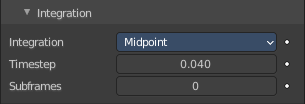
Integrators are a set of mathematical methods available to calculate the movement of particles. The following guidelines will help to choose a proper integrator, according to the behavior aimed at by the animator.
Integration
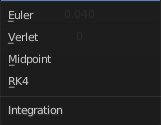
Euler
Also known as “Forward Euler”. Simplest integrator. Very fast but also with less exact results. If no dampening is used, particles get more and more energy over time. For example, bouncing particles will bounce higher and higher each time. Should not be confused with “Backward Euler” (not implemented) which has the opposite feature, the energy decrease over time, even with no dampening. Use this integrator for short simulations or simulations with a lot of dampening where speedy calculations are more important than accuracy.
| Entry | What it does |
|---|---|
| Verlet | Very fast and stable integrator, energy is conserved over time with very little numerical dissipation. |
| Midpoint | Also known as “2nd order Runge-Kutta”. Slower than Euler but much more stable. If the acceleration is constant (no drag for example), it is energy conservative. It should be noted that in example of the bouncing particles, the particles might bounce higher than they started once in a while, but this is not a trend. This integrator is a generally good integrator for use in most cases. |
| RK4 | Short for “4th order Runge-Kutta”. Similar to Midpoint but slower and in most cases more accurate. It is energy conservative even if the acceleration is not constant. Only needed in complex simulations where Midpoint is found not to be accurate enough. |
| Entry | What it does |
|---|---|
| Time step | The amount of simulation time (in seconds) that passes during each frame. |
| Sub frames | The number of simulation steps per frame. Sub frames to simulate for improved stability and finer granularity in simulations. Use higher values for faster-moving particles. |
Physics Panel - Physics type Keyed
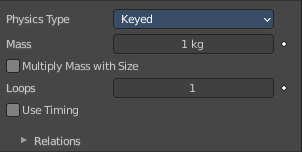
The path of Keyed particles is determined between particles of any two (or more) particle systems. This allows the creation of a chains of systems to create long strands or groovy moving particles. Basically the particles have no dynamics but are interpolated from one system to the next each frame.
To setup Keyed particles you need at least two particle systems in the Keys list.
| Entry | What it does |
|---|---|
| Mass | Specify the mass of the particles. |
| Multiply Mass with Size | Causes larger particles to have larger masses. |
| Loops | Sets the number of times the entire Keys list is repeated. Disabled if Use Timing is enabled. |
| Use Timing | Specify the timing for each key independently, using the Time and Duration options. By default, the Use Timing option is deactivated, and the particles will pass through all keys for a time equal to its lifetime. A shorter lifetime means faster movement. The lifetime will be split equally between the keys, this may lead to varying particle speeds between the targets. |
Relations sub tab
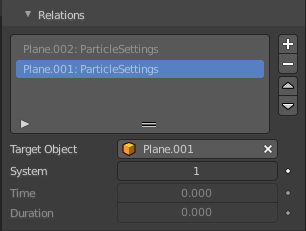
Particle Targets list
A list of the available particle systems. You need at least two.
| Entry | What it does |
|---|---|
| Drag Handler | The two vertical lines at the end is a handler with which you can expand the list. |
| Search Field | You can expand a search field at the bottom of the list. Type in your term and hit enter to filter for your term. · Invert: Exclude the search term instead of searching for it. · Sort by Name: Sort the List by name. |
New Particle Target
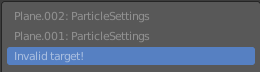
Add a particle target. You need to specify the object that contains the particle system, which can be done below. Empty particle targets are marked as Invalid target!
| Entry | What it does |
|---|---|
| Move Up Target / Move Down Target | Move the selected particle target up or down in the list. |
| Target Object | Choose the target object that contains the particle system. |
| System | The index of the particle system on the target object. |
| Time | Becomes active when Use Timing is activated. The start time. |
| Duration | Becomes active when Use Timing is activated. The duration. |
Physics Panel - Physics type Boid
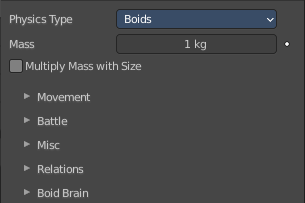
Boids particle systems are controlled by a limited artificial intelligence, which can be programmed to follow basic rules and behaviors. They are ideal for simulating flocks, swarms, herds and schools of various kind of animals, insects and fishes or predators vs. preys simulations. They can react on the presence of other objects and on the members of their own system. Boids can handle only a certain amount of information, therefore the sequence of the Boid Brain rules is very important. In certain situations only the first three parameter are evaluated.
| Entry | What it does |
|---|---|
| Mass | Specify the mass of the particles. |
| Multiply Mass with Size | Causes larger particles to have larger masses. |
Movement subpanel
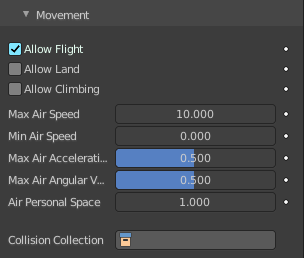
Boids try to avoid objects with activated Collision. They try to reach goal objects, and fly from “predators” according to the Boid Brain settings.
Boids can have different physics depending on whether they are in the air, or on land (on collision object).
Allow Flight
Allow boids to move in the air.
Allow Land
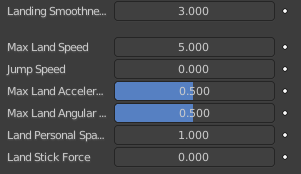
Allow boids to move on land. Activating this setting will reveal further sliders.
| Entry | What it does |
|---|---|
| Allow Climbing | Allow boids to climb goal objects. |
| Max Air Speed | Set the Maximum velocity in the air. |
| Min Air Speed | Set the Minimum velocity in the air. |
| Max Air Acceleration | Lateral acceleration in air, percentage of the max velocity (turn). Defines how fast a boid is able to change direction. |
| Max Air Angular Velocity | Tangential acceleration in air, percent 180 degrees. Defines how much the boid can suddenly accelerate in order to fulfill a rule. |
| Air Personal Space | Radius of boids personal space in air. Percentage of particle size. |
| Landing Smoothness | How smoothly the boids land. |
| Max Land Speed | Set the Maximum velocity on land. |
| Jump Speed | Maximum speed for jumping. |
| Max Land Acceleration | Lateral acceleration on land, percent of max velocity (turn). Defines how fast a boid is able to change direction. |
| Max Land Angular Velocity | Tangential acceleration on land, percent 180 degrees. Defines how much the boid can suddenly accelerate in order to fulfill a rule. |
| Land Personal Space | Radius of boids personal space on land. Percentage of particle size. |
| Land Stick Force | How strong a force must be to start effecting a boid on land. |
| Collision Collection | Only collide with objects in this collection. |
Battle subpanel
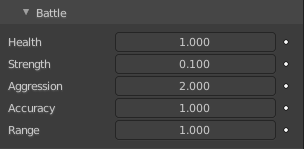
| Entry | What it does |
|---|---|
| Health | Initial boid health when born. |
| Strength | Maximum caused damage per second on attack. |
| Aggression | Boid will fight this time stronger than enemy. |
| Accuracy | Accuracy of attack. |
| Range | Maximum distance of which a boid can attack. |
Misc subpanel
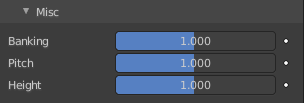
| Entry | What it does |
|---|---|
| Banking | Amount of rotation around velocity vector on turns. Banking of 1.0 gives a natural banking effect. |
| Pitch | Amount of rotation around side vector. |
| Height | Boid height relative to particle size. |
Relations subpanel
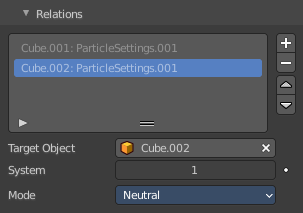
Boid particles can react with other particle systems. This list allows you to select other objects with their particle systems.
| Entry | What it does |
|---|---|
| Deflection | Boids will try to avoid deflector objects according to the Collision rule’s weight. It works best for convex surfaces (some work needed for concave surfaces). |
| Force Fields | As other physics types, Boids is also influenced by external force fields. In addition, special Boid force fields can be used with the Boids physics. These effectors could be predators (positive Strength) that boids try to avoid, or targets (negative Strength) that boids try to reach according to the (respectively) Avoid and Goal rules of the Boid Brain. |
Particle Targets list
A list of the available particle systems.
| Entry | What it does |
|---|---|
| Drag Handler | The two vertical lines at the end is a handler with which you can expand the list. |
| Search Field | You can expand a search field at the bottom of the list. Type in your term and hit enter to filter for your term. · Invert: Exclude the search term instead of searching for it. · Sort by Name: Sort the List by name. |
New Particle Target
Add a particle target. You need to specify the object that contains the particle system, which can be done below. Empty particle targets are marked as Invalid target!
Move Up Target / Move Down Target
Move the selected particle target up or down in the list.
| Entry | What it does |
|---|---|
| Target Object | Choose the target object that contains the particle system. |
| System | Index of the Object’s particle system as set in the list view in the particle panel. |
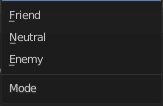
Mode
| Entry | What it does |
|---|---|
| Enemy | Setting the type to Enemy will cause the systems to fight with each other. |
| Friend | Will make the systems work together. |
| Neutral | Will not cause them to align or fight with each other. |
Boid Brain subpanel
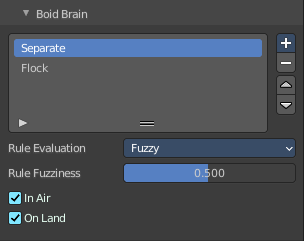
The Boid Brain panel controls how the boids particles will react with each other. The boids’ behavior is controlled by a list of rules. Only a certain amount of information in the list can be evaluated. If the memory capacity is exceeded, the remaining rules are ignored.
The rules are by default parsed from top-list to bottom-list (thus giving explicit priorities), and the order can be modified using the little arrows buttons on the right side.
List of Rules
The list of the current rules.
Search Field

You can expand a search field at the bottom of the list. Type in your term and hit enter to filter for your term.
| Entry | What it does |
|---|---|
| Invert | Exclude the search term instead of searching for it. |
| Sort by Name | Sort the List by name. |
Add Boid Rule
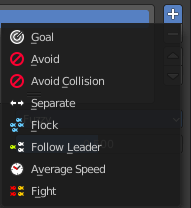
A list of the available boid rules. Each rule has different settings.
All rules
Rule Evaluation
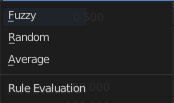
There are three ways to control how rules are evaluated:
| Entry | What it does |
|---|---|
| Average | All rules are averaged. |
| Random | A random rule is selected for each boid. |
Fuzzy
Uses fuzzy logic to evaluate rules. Rules are gone through top to bottom. Only the first rule that affect above the Rule Fuzziness threshold is evaluated. The value should be considered how hard the boid will try to respect a given rule (a value of 1 means the Boid will always stick to it, a value of 0 means it will never). If the boid meets more than one conflicting condition at the same time, it will try to fulfill all the rules according to the respective weight of each.
Note: A given boid will try as much as it can to comply to each of the rules it is given, but it is more than likely that some rule will take precedence on other in some cases. For example, in order to avoid a predator, a boid could probably “forget” about Collision, Separate and Flock rules, meaning that “while panicked” it could well run into obstacles, e.g. even if instructed not to, most of the time.
Rule Fuzziness
The fuzziness for the rule evaluation method Fuzzy.
| Entry | What it does |
|---|---|
| In Air | The current rule affects boids while they are flying. |
| On Land | The current rule affects boids while they are not flying. |
Goal Boid Rule

Seek the goal.
| Entry | What it does |
|---|---|
| Object | Specifies the goal object. If not specified, Boid force fields with negative Strength are used as goals. |
| Predict | Predict target’s movements. |
Avoid Boid Rule
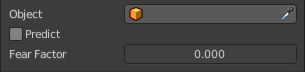
Avoid “predators”.
| Entry | What it does |
|---|---|
| Object | Specifies the object to avoid. If not specified, Boid force fields with positive Strength are used as predators. |
| Predict | Predict target’s movements. |
| Fear Factor | Avoid object if danger from it is above this threshold. |
Avoid Collision Boid Rule
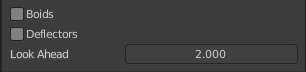
Avoid objects with activated Deflection.
| Entry | What it does |
|---|---|
| Boids | Avoid collision with other boids. |
| Deflectors | Avoid collision with deflector objects. |
| Look Ahead | Time to look ahead in seconds. |
| Entry | What it does |
|---|---|
| Separate Boid Rule | Boids move away from each other. |
| Flock Boid Rule | Copy movements of neighboring boids, but avoid each other. |
Follow Leader Boid Rule

Follows a leader object instead of a boid.
| Entry | What it does |
|---|---|
| Object | Pick the leader object. |
| Distance | Distance behind leader to follow. |
| Line | Follow the leader in a line. |
Queue Size

How many boids that are allowed to follow in a line.
Average Speed Boid Rule

Maintain average velocity.
| Entry | What it does |
|---|---|
| Speed | Percentage of maximum speed. |
| Wander | How fast velocity’s direction is randomized. |
| Level | How much velocity’s Z component is kept constant. |
Fight Boid Rule

Move toward nearby boids.
| Entry | What it does |
|---|---|
| Fight Distance | Attack boids at a maximum of this distance. |
| Flee Distance | Flee to this distance. |
| Entry | What it does |
|---|---|
| Remove Boid Rule | Remove the boid rule from the list. |
| Move Up / Move Down Boid Rule | Move the boid rule up or down the list. |
Physics Panel - Physics type Fluid
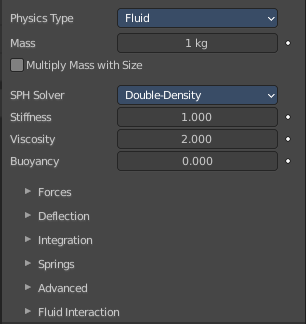
Fluid particles are similar to Newtonian particles. But the particles are influenced by internal forces like pressure, surface tension, viscosity, springs, etc. The range goes from liquids to slime, goo to sand and wispy.
| Entry | What it does |
|---|---|
| Mass | Specify the mass of the particles. |
| Multiply Mass with Size | Causes larger particles to have larger masses. |
| SPH Solver | Smoothed-particle hydrodynamics (SPH) is a computational method used for simulating fluid flows. It is a mesh-free Lagrangian method where the coordinates move with the fluid. · Double density: An artistic solver with strong surface tension effects. Reveals the Spring sub panel. · Classic: A more physically accurate solver. |
| Stiffness | How incompressible the fluid is. |
| Viscosity | Linear viscosity. Use lower viscosity for thicker fluids. |
| Buoyancy | Artificial buoyancy force in negative gravity direction based on pressure differences inside the fluid. |
Forces subpanel
| Entry | What it does |
|---|---|
| Brownian | Specify the amount of Brownian motion. Brownian motion adds random motion to the particles based on a Brownian noise field. |
| Drag | A force that reduces particle velocity in relation to its speed and size (useful in order to simulate air drag or water drag). |
| Damp | Reduces particle velocity (deceleration, friction, dampening). |
Deflection subpanel
| Entry | What it does |
|---|---|
| Size Deflect | Use the particle size in deflections. |
| Die on Hit | Kill particle when it hits a deflector object. |
| Collision Collection | If set, particles collide with objects from the collection. |
Integration subpanel
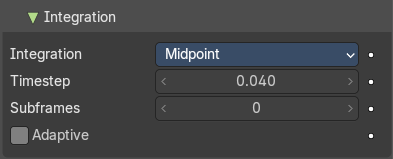
Integrators are a set of mathematical methods available to calculate the movement of particles. The following guidelines will help to choose a proper integrator, according to the behavior aimed at by the animator.
Integration
Euler
Also known as “Forward Euler”. Simplest integrator. Very fast but also with less exact results. If no dampening is used, particles get more and more energy over time. For example, bouncing particles will bounce higher and higher each time. Should not be confused with “Backward Euler” (not implemented) which has the opposite feature, the energy decrease over time, even with no dampening. Use this integrator for short simulations or simulations with a lot of dampening where speedy calculations are more important than accuracy.
| Entry | What it does |
|---|---|
| Verlet | Very fast and stable integrator, energy is conserved over time with very little numerical dissipation. |
| Midpoint | Also known as “2nd order Runge-Kutta”. Slower than Euler but much more stable. If the acceleration is constant (no drag for example), it is energy conservative. It should be noted that in example of the bouncing particles, the particles might bounce higher than they started once in a while, but this is not a trend. This integrator is a generally good integrator for use in most cases. |
| RK4 | Short for “4th order Runge-Kutta”. Similar to Midpoint but slower and in most cases more accurate. It is energy conservative even if the acceleration is not constant. Only needed in complex simulations where Midpoint is found not to be accurate enough. |
| Entry | What it does |
|---|---|
| Time step | The amount of simulation time (in seconds) that passes during each frame. |
| Sub frames | The number of simulation steps per frame. Sub frames to simulate for improved stability and finer granularity in simulations. Use higher values for faster-moving particles. |
| Adaptive | Automatically set the number of subframes. |
Springs Subpanel
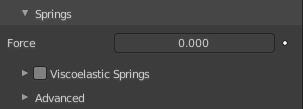
Force
Spring force.
Viscoelastic Springs
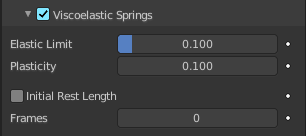
Use viscoelastic springs instead of Hooke’s springs.
| Entry | What it does |
|---|---|
| Elastic Limit | How much the spring has to be stretched/compressed in order to change its rest length. |
| Plasticity | How much the spring rest length can change after the elastic limit is crossed. |
| Initial Rest Length | Use initial length as spring rest length instead of 2 × particle size. |
| Frames | Create springs for this number of frames since particle’s birth (0 is always). |
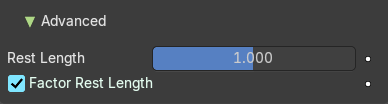
Advanced
| Entry | What it does |
|---|---|
| Rest Length | Rest length of springs. Factor of particle radius. Checkbox sets this to be a factor of 2 × particle size. |
| Factor Rest Length | Spring rest length is a factor of 2* particle size. |
Fluid Interaction
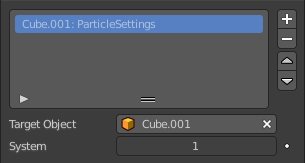
Add a particle system to interact with the fluid.
Particle Targets list
A list of the available particle systems.
Search Field
You can expand a search field at the bottom of the list. Type in your term and hit enter to filter for your term.
| Entry | What it does |
|---|---|
| Invert | Exclude the search term instead of searching for it. |
| Sort by Name | Sort the List by name. |
| Entry | What it does |
|---|---|
| Target Object | Choose the target object that contains the particle system. |
| System | The index of the particle system on the target object. |