

































































Emitter - Emission Panel
The buttons in the Emission panel control the way particles are emitted over time.
Emission Panel
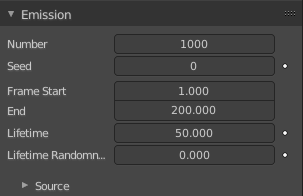
The buttons in the Emission panel control the way particles are emitted over time.
| Entry | What it does |
|---|---|
| Number | The maximum amount of parent particles used in the simulation. |
| Seed | Blender uses this as starting point to produce random numbers during the simulation. |
| Frame Start | The start frame of particle emission. You may set negative values, which enables you to start the simulation before the actual rendering. |
| End | The end frame of particle emission. |
| Lifetime | The lifespan (in frames) of the particles. |
Lifetime Randomness
A random variation of the lifetime of a given particle. The shortest possible lifetime is Lifetime × (1 - Random). Values above 1.0 are not allowed. For example with the default Lifetime value of 50 a Random setting of 0.5 will give you particles with a live span ranging from 50 frames to 50×(1.0-0.5)=25 frames, and with a Random setting of 0.75 you will get particles with live spans ranging from 50 frames to 50×(1.0-0.75)=12.5 frames.
Source
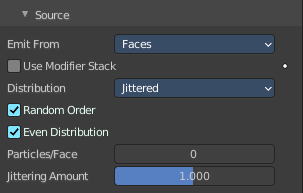
Emit From
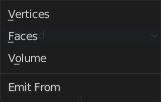
Defines how and where the particles are emitted, giving precise control over their distribution. Defines also what content is displayed in the source sub panel.
Tip: You may use vertex groups to confine the emission, that is done in the Vertex Groups panel.
Vertices
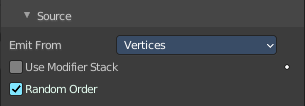
Emits particles from the vertices of a mesh.
| Entry | What it does |
|---|---|
| Use Modifier Stack | Take any Modifiers above the Particle Modifier in the modifier stack into account when emitting particles, else it uses the original mesh geometry. |
| Random Order | The emitter element indices are gone through in a random order instead of linearly (one after the other). |
Faces & Volume
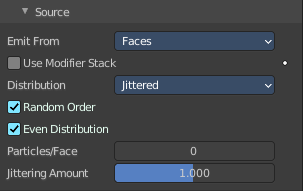
Faces emits particles from the surface of a mesh’s faces.
Volume emits particles from the volume of an enclosed mesh. Your mesh must be manifold to emit particles from the volume. Some modifiers like the Edge Split Modifier break up the surface, in which case volume emission will not work correctly!
Use Modifier Stack
Take any Modifiers above the Particle Modifier in the modifier stack into account when emitting particles, else it uses the original mesh geometry.
Distribution
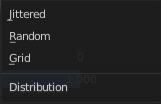
These settings control how the emissions of particles are distributed throughout the emission locations when emitting from either Faces or Volume.
JitteredRandom Order
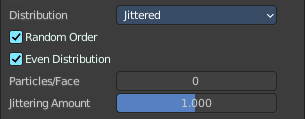
The emitter element indices are gone through in a random order instead of linearly (one after the other).
| Entry | What it does |
|---|---|
| Even Distribution | Particle distribution is made even based on surface area of the elements, i.e. small elements emit less particles than large elements, so that the particle density is even. |
| Particles/Face | Number of emissions per face (0 = automatic). |
| Jittering Amount | Amount of jitter applied to the sampling. |
RandomRandom Order
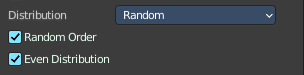
The emitter element indices are gone through in a random order instead of linearly (one after the other).
Even Distribution
Particle distribution is made even based on surface area of the elements, i.e. small elements emit less particles than large elements, so that the particle density is even.
GridInvert Grid
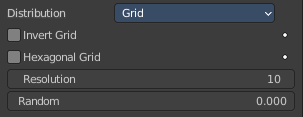
Invert what is considered the object and what is not.
| Entry | What it does |
|---|---|
| Hexagonal Grid | Uses a hexagonal-shaped grid instead of a rectangular one. |
| Resolution | Resolution of the grid. |
| Random | Add a random offset to grid locations. |