

































































Light Probe Object
Light Probe objects are just useful for EEVEE and Cycles. Working with Light probes is a real time render technique. The light gets precalculated into a light probe object that are then used to indirectly light the…
Light Probes Introduction
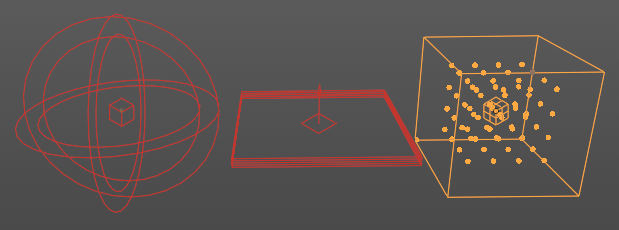
Light Probe objects are just useful for EEVEE and Cycles. Working with Light probes is a real time render technique. The light gets precalculated into a light probe object that are then used to indirectly light the scene.
There are three different probe types: Sphere/Box, Plane and Volume. Volume and Plane is meant for specular lighting. Sphere/Box is used for diffuse lighting.
| Entry | What it does |
|---|---|
| General Use | Add the Light Probe to the scene, use them in strategic positions covering the scene objects, and adjust settings. To work with the Volume light probes you need to bake them. |
| Sphere | Adds a reflective light probe in sphere shape. A light probe sphere records the light incoming from many directions at a single location. · Use: Used for smooth and semi-rough reflections. Sphere probes smoothly blend to light probe volume lighting for completely diffuse reflections. Note: If Raytracing is turned on, they are used as a fallback if a ray misses. |
Plane
Adds a reflective light probe in plane shape. A light probe plane records the light incoming from a single direction for all visible points on a plane.
Use
Light probe planes only work when the ray tracing method is set to screen-tracing in the Render Properties tab of the Prop. When enabled, they accelerate the tracing process and complete the missing data from the screen space ray tracing.
Note: The specular reflection direction is the only one currently available. This type of light probe is suited to smooth planar surfaces. Each visible planar light probe increases the render time as the scene needs to be rendered for each of them.
Volume
Adds a volumetric array light probe in a bounding box.
Use
A volume probe records the light incoming from all directions at many locations inside a volume. The capture point positions are visible as an overlay with dots in a 3D grid when the Irradiance Volume object is selected and affects any object inside the volume 3D Grid.
Note: Light is filtered and only the diffuse light is recorded. If an object is not inside any Irradiance Volume, or if the indirect lighting has not been baked, the world’s diffuse lighting will be used to shade it.
Probe panel - Sphere lightprobe
Eevee
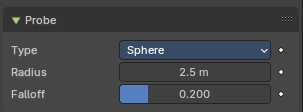
Type
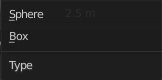
The type of the influence volume. It can either sample a sphere or a bounding box.
| Entry | What it does |
|---|---|
| Radius / Size | A probe object only influences the lighting of nearby surfaces. This influence zone is defined by the Distance parameter and object scaling. The influence distance varies is a bit, depending on the probe type. For Reflection Cubemaps the influence volume can either be a box or a sphere centered on the probe’s origin. |
| Falloff | Percentage of the influence distance during which the influence of a probe fades linearly. |
Cycles
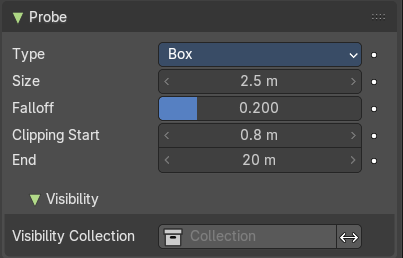
Clipping Start/End
Note: Cycles only
Define the near and far clip distances when capturing the scene.
Visibility

Visibility Collection
Note: Cycles only
In some cases, it is useful to limit which objects appear in the light probe’s captured lighting. For instance, an object that is too close to a capture point might be better excluded. This is what the visibility collection does. Only objects that are in this collection will be visible when this probe will capture the scene.
There is also an option to invert this behavior and effectively hide the objects inside this collection.
Note: This is only a filtering option. That means that if an object is not visible at render time it won’t be visible during the probe render. Note: Due to a limitation, dupli-objects cannot be hidden by using this option.
Probe panel - Plane lightprobe
Eevee
Distance
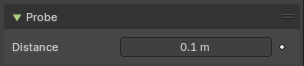
A probe object only influences the lighting of nearby surfaces. This influence zone is defined by the Distance parameter and object scaling. The influence distance varies is a bit, depending on the probe type.
For Reflection Planes the influence distance is the distance from the plane. Only surfaces whose normals are aligned with the Reflection Plane will receive the captured reflection.
Cycles
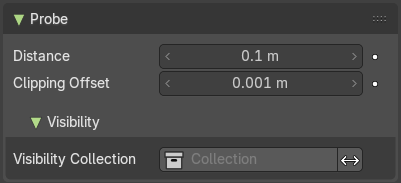
Clipping Offset
Note: Cycles only
Define how far below the plane the near clip is when capturing the scene.
Note: Increasing this can fix reflection contact problems.
Visibility subpanel
Note: This group of properties is Cycles only.
Visibility Collection
In some cases, it is useful to limit which objects appear in the light probe’s captured lighting. For instance, an object that is too close to a capture point might be better excluded. This is what the visibility collection does. Only objects that are in this collection will be visible when this probe will capture the scene.
There is also an option to invert this behavior and effectively hide the objects inside this collection.
Note: This is only a filtering option. That means that if an object is not visible at render time it won’t be visible during the probe render. Note: Due to a limitation, dupli-objects cannot be hidden by using this option.
Probe panel - Volume lightprobe
Eevee
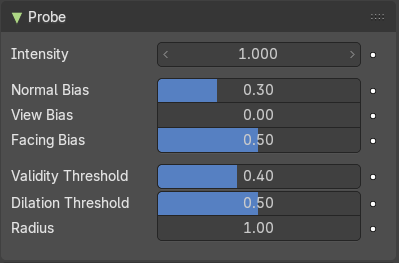
| Entry | What it does |
|---|---|
| Intensity | Intensity factor of the recorded lighting from the light probe. Adjusting this parameter to anything other than 1.0 is not physically correct. Use this for tweaking, animating or artistic purposes. |
| Normal Bias | Offset sampling of the irradiance grid in the surface normal direction to reduce light bleeding. Note: Can lead to specular highlight artifacts appearing if diffuse surface is set too high. |
| View Bias | Offset sampling of the irradiance grid in the viewing direction to reduce light bleeding. Note: Can lead to view dependent results if set too high. Adjust this if camera is static in animations. |
| Facing Bias | When set to zero, this helps avoid capturing points behind the shaded surface that may bleed light onto the shaded surface. Note: This produces non-smooth interpolation when the capture resolution is high. Increasing this bias will make the interpolation smoother but also introduce some light bleeding. |
Validity Threshold
During the baking process, a validity score is assigned to each capture point. Capture points with validity below this threshold will be ignored during lighting interpolation. This remove the influence of capture points trapped inside closed geometry, reducing the artifacts they produced.
Note: During the baking process, a validity score is assigned to each capture point. This score is based on the number of back-faces hit when capturing the incoming lighting. Only materials with Single Sided turned on for Light Probe Volumes will reduce the validity score.
| Entry | What it does |
|---|---|
| Dilation Threshold | During the baking process, a validity score is assigned to each capture point. Capture points with validity below this threshold will have their data replaced using valid neighbors. |
| Radius | Radius in capture points in which to search for a valid neighbor. |
Cycles
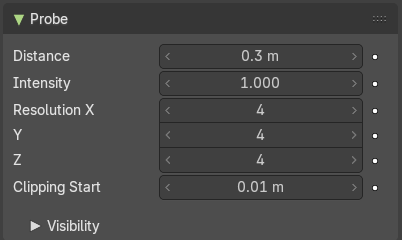
| Entry | What it does |
|---|---|
| Distance | Influence distance of the probe. |
| Intensity | The intensity of the lighting captured by this probe. |
| Resolution X / Y | Number of samples. |
| Clipping Start | Objects below the distance will not appear in reflections. |
Visibility subpanel
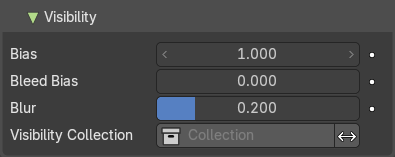
| Entry | What it does |
|---|---|
| Bias | Bias for reducing self shadowing. |
| Bleed Bias | Bias for reducing Light bleed on variance shadow maps. |
| Blur | Filter size of visibility blur. |
Visibility Collection
Note: Cycles only
In some cases, it is useful to limit which objects appear in the light probe’s captured lighting. For instance, an object that is too close to a capture point might be better excluded. This is what the visibility collection does. Only objects that are in this collection will be visible when this probe will capture the scene.
There is also an option to invert this behavior and effectively hide the objects inside this collection.
Note: This is only a filtering option. That means that if an object is not visible at render time it won’t be visible during the probe render. Note: Due to a limitation, dupli-objects cannot be hidden by using this option.
Sphere Lightprobe - Capture panel
Note: The Capture panel is EEVEE only.
Clipping Start / End
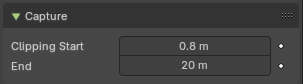
Note: Sphere Light Probe only.
Define the near and far clip distances when capturing the scene.
Clipping Offset
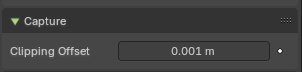
Note: Plane Light Probe only.
Define how much below the plane the near clip is when capturing the scene. Increasing this can fix reflection contact problems.
Sphere Lightprobe - Custom Parallax panel
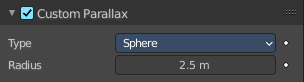
Note: Sphere Light Probe only.
By default, the influence volume of a Sphere and Box light probe is also the parallax volume. The parallax volume is a volume where the recorded lighting is projected. It should roughly fit surrounding area the light probe should influence. In some cases it may be better to adjust the parallax volume without touching the influence parameters. In this case, enable the Custom Parallax and change the shape and distance of the parallax volume independently.
Custom Parallax Toggle
Turn the custom parallax on/off.
Type
The type of parallax volume. One is a sphere shape, the other is a box shape.
Radius / Size
The size of the parallax volume. Measured by the lowest corner of the parallax bounding box.
Volume Lightprobe - Bake panel
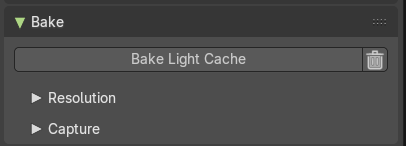
Note: Volume Light Probe only.
Light probe volume light data is static and needs to be manually baked. Once baked, the data is stored inside the object data-block and can be moved, animated and linked between blender files.
Note: Baking uses the render visibility of the objects in the scene.
| Entry | What it does |
|---|---|
| Bake Light Cache | Bakes the light cache to the scene data. This may take a moment. |
| Delete Light Cache | Removed the light cache from the scene data. |
Resolution subpanel
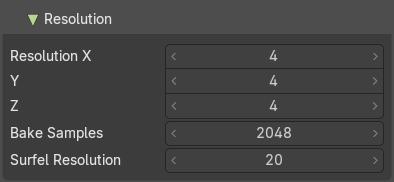
| Entry | What it does |
|---|---|
| Resolution X, Y, Z | Spatial resolution for volumetric light probes is determined per probe. The local volume is divided into a regular grid of the specified dimensions. The lighting will be captured for each cell in this grid. |
| Bake Samples | Number of ray directions to evaluate when baking. This increases the baking time proportionally to the size of the scene contents. |
| Surfel Resolution | Number of surfels to spawn in one local unit distance. A serfel is similar to a lighting “voxel”. Higher values increase quality, but have a huge impact on memory usage. General recommendation is twice the value. |
Capture subpanel
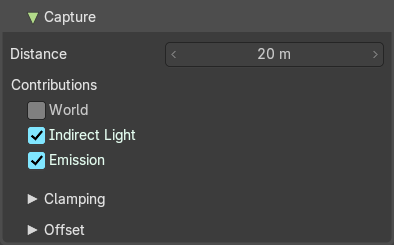
| Entry | What it does |
|---|---|
| Capture Distance | Distance around the light probe volume that will be captured during the bake. Note: A distance of 0 will only considered the inside of the volume. |
| World Contribution | Bake incoming light from the world instead of just scene contents visibility for more accurate lighting, in exchange for less correct blending to surrounding irradiance volumes. |
| Indirect Light Contribution | Capture light bounces from light source. |
| Emission Contribution | Capture emissive surfaces when baking. |
Clamping subpanel
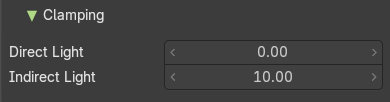
| Entry | What it does |
|---|---|
| Direct Light | Clamp incoming direct light. 0 disables direct light clamping. **Note:**Here direct light refers to the light that bounces only once (from the light object) or light coming from emissive materials. |
| Indirect Light | Clamp incoming indirect light. 0 disables indirect light clamping. Note: Here indirect light refers to the light that bounces off a surface after the first bounce (from the light object) or during the first bounce if the light comes from emissive materials. |
Offset subpanel
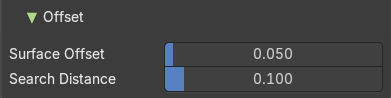
In order to reduce artifacts caused by difficult capture point positioning, the bake process adjusts their location before capturing light. It moves the capture points slightly away from surrounding surfaces and tries to move them out of objects if they are not too far below the surface.
| Entry | What it does |
|---|---|
| Surface Offset | Distance to move the capture points away from surfaces. |
| Search Distance | Distance to search for valid capture positions if the capture point is near the back-face of a single-sided object. Note: Only materials with Single Sided turned on for Light Probe Volumes will move capture point position. |
Viewport Display panel
Sphere
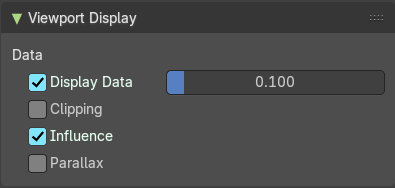
| Entry | What it does |
|---|---|
| Data | Show the captured light using small diffuse sphere of the given size. |
| Influence | Show the influence bounds in the 3D Viewport. The inner sphere is where the falloff starts. |
| Clipping | Show the clipping distance in the 3D Viewport. |
| Parallax | Show the Custom Parallax shape in the 3D Viewport. |
Plane
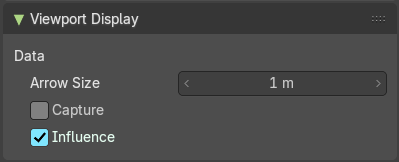
| Entry | What it does |
|---|---|
| Arrow Size | Size of the arrow showing the reflection plane normal. |
| Capture | Show the captured reflected image onto a fully reflective plane in the 3D Viewport. |
| Influence | Show the influence bounds in the 3D Viewport. |
Volume
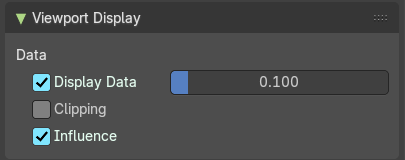
| Entry | What it does |
|---|---|
| Data | Show the captured light using small diffuse sphere of the given size. |
| Clipping | Show the clipping distance in the 3D Viewport. |
| Influence | Show the influence bounds in the 3D Viewport. The inner sphere is where the falloff starts. |