

































































NLA Editor - Sidebar - Strip tab
The settings for the currently selected action strip. You need to have a action strip selected to show this tab.
Strip Tab
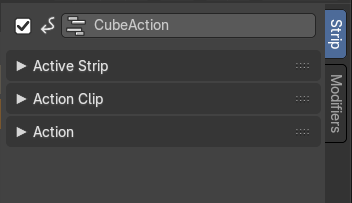
The settings for the currently selected action strip. You need to have a action strip selected to show this tab.
| Entry | What it does |
|---|---|
| Name | The name of the currently selected action strip. To rename the strip click into the edit field, change the name and press enter. |
| Mute | Disable the action strip. |
Active Strip panel
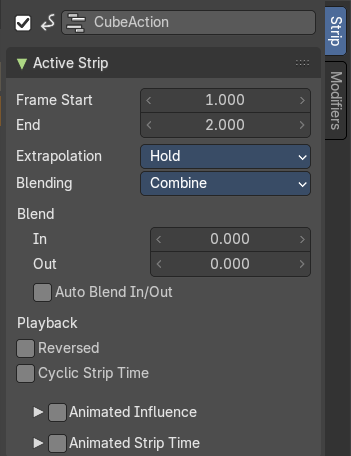
Frame Start + End
The start and end position of the strip.
Extrapolation
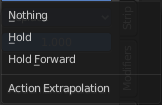
Action to take for gaps past the strip extents.
| Entry | What it does |
|---|---|
| Hold | Affects both sides of the strip. This should only be set on the very first strip. |
| Hold Forward | Affects the region after the clip, only. This can be set on any strip. |
| Nothing | Affects only the region of the strip itself. This can be set on any strip. |
Blending
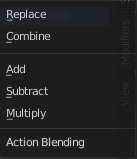
Affects how the property values directly produced by the strip are combined with the result of evaluating the stack below. The bottom-most strip is blended on top of the default values of the properties.
Replace
The top strip is linearly blended in with the accumulated result according to influence, completely overwriting it if influence is set to 100%.
Combine
Depending on the type of each property, one of the following methods is automatically chosen:
Axis/Angle Rotation
result=previous+value*influence
This results in averaging the axis and adding the amount of rotation.
Quaternion Rotation
Quaternion math is applied to all four channels of the property at once:
result=previous×valueinfluence
Proportional (Scale)
result=previous*(value/default)influence
Others
result=previous+(value-default)*influence
This allows layering actions that can also be used as a standalone. Properties keyframed at their default values remain at default.
Add, Subtract, Multiply
The result of the strip is multiplied, subtracted, or added to the accumulated results, and then blended in according to influence.
result=mix(previous,previous(+-*)value,influence)
| Entry | What it does |
|---|---|
| Blend In + Out | Number of frames to fade in or out the action strip. |
| Auto Blend In/Out | Number of frames for blending in and out is automatically calculated from overlapping strips. |
| Playback | Reversed: The action strip is played in reversed order. This just works when timing is determined automatic. · Cyclic Strip Time: Cycle the action strip. |
Animated Influence subpanel
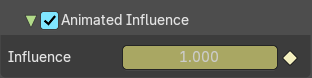
Control the influence settings by an F-Curve instead of automatically determined. The F-Curve can be edited in the Graph Editor.
| Entry | What it does |
|---|---|
| Influence | The influence value. |
| Animate Property | Set or remove a keyframe at current position. |
Animated Strip Time subpanel
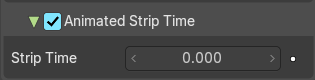
Control the Strip time settings by an F-Curve instead of automatically determined. The F-Curve can be edited in the Graph Editor.
| Entry | What it does |
|---|---|
| Influence | The influence value. |
| Animate Property | Set or remove a keyframe at current position. |
Action Clip panel
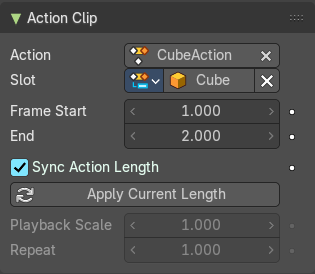
This represents the ‘object data’ of the strip. Much like the transform values of an object.
| Entry | What it does |
|---|---|
| Action | The action that is referenced in the strip. This can be changed to replace the current strip’s value with another Action in the scene. |
| Slot | Define which subset is meant for this strip. |
| Frame Start / End | The start and end frame values of the strip. Note. To loop the animation you might need to reduce the End Frame by one frame to have a loopable animation. Note. If you select values that are above or below the actual keyframe count of the Action, then the F-curve Extrapolation will be applied. |
| Sync Length | Set the Start and End Frames to the first and last keyframed frames of the Action. |
| Now | Causes the Start and End Frames, above, to be reset to the first and last keyframed frames of the Action. |
| Playback Scale | Stretches the strip. |
| Repeat | Repeats the strip by the chosen value. With a value of 1 the strip plays once. |
Action panel
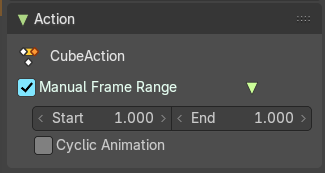
| Entry | What it does |
|---|---|
| Manual Frame Range | Set the playback frame range manually. · Start: The start frame. · End: The end frame. |
| Cyclic Animation | Make the animation loop. |