

































































NLA Editor - Strip Menu
This menu contains functionality to manage the keyframes.
NLA Editor - Strip Menu
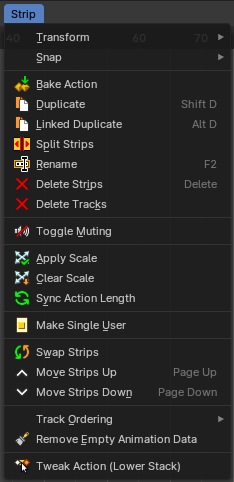
This menu contains functionality to manage the keyframes.
Transform

Grab/Move
Moves the selected keyframe(s).
Last Operator Move
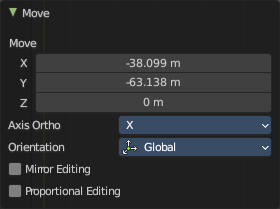
Move X, Y Z
The position. Attention, the actual world orientation and rotation does not matter here. It always starts with a value of zero, and moves relative to this zero then. For the actual location values have a look in the sidebar in the transform panel.
Orientation
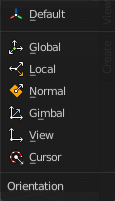
The widget can have different orientations. The menu items should be self explaining.
Mirror Editing
Enable Mirror editing
Proportional editing
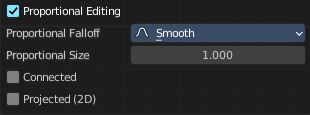
Proportional editing is not available for this mode.
Extend
Moves the last keyframes of the selection.
Last Operator Transform
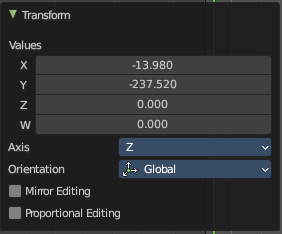
| Entry | What it does |
|---|---|
| Values X, Y Z, W | The new position. |
| Axis | Which axis to transform. |
Orientation
The widget can have different orientations. The menu items should be self explaining.
Mirror Editing
Enable Mirror editing
Proportional editing
Proportional editing is not available for this mode.
Scale
Scales the selected keyframes. You need to have more than one keyframe selected.
Last Operator Resize
| Entry | What it does |
|---|---|
| Angle | The rotation. Attention, the actual world orientation and rotation does not matter here. It always starts with a value of zero, and rotates relative to this zero then. For the actual rotation values have a look in the sidebar in the transform panel. |
| Axis | Which axis to rotate. |
Orientation
The widget can have different orientations. The menu items should be self explaining.
Mirror Editing
Enable Mirror editing
Proportional editing
Proportional editing is not available for this mode.
Snap
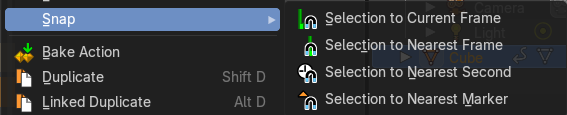
Snaps the selected keyframes by the chosen method.
| Entry | What it does |
|---|---|
| Bake Action | Bakes all selected objects locations/scale/rotation animations to an action. To use this operator, a dialogue will prompt to define the parameters before applying the bake action. The final animation of the selected objects or bones is computed with all modifiers, drivers, and constraints applied with keyed results per frame step in a range. |
| Duplicate | Duplicate selected keyframes. |
Linked Duplicate
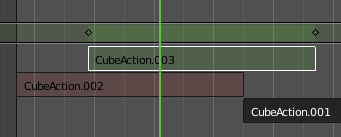
Duplicates the selected strip(s), and creates a new track for the duplicates. This copy is linked to the original action strip. Modifications at the original will also affect the linked action strip.
Linked strips are visually different from normal strips. And when you start to modify the linked duplicate, then the original strip will turn red.
Split Strips
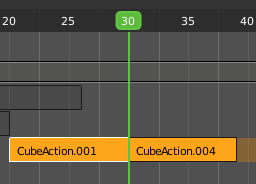
Splits the selected strip(s) at the marker position.
Rename
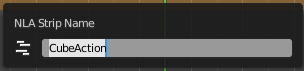
Allows you to rename the current NLA strip. The operator calls a rename popup.
| Entry | What it does |
|---|---|
| Delete Strips | Deletes the selected strips. |
| Delete Tracks | Deletes the selected track(s). Toggle Muting Disables the selected action clip. Be careful, there is no visual hint if the clip is muted or not. |
| Apply Scale | Applies the current scale of the clips to be 1. |
| Clear Scale | Resets the scale of the clip back to 1. |
| Sync Action Length | Synchronize the length of the action with the keyframe length used in the strip. |
| Make Single User | You can create linked duplicates. Make single user makes them into individual clips. |
| Swap Strips | Swaps the selected strips. |
| Move strips up | Moves the selected action strips upwards into the next track. |
| Move Strips down | Moves the selected action strips downwards into the next track. |
Tweak Action (Lower Stack)
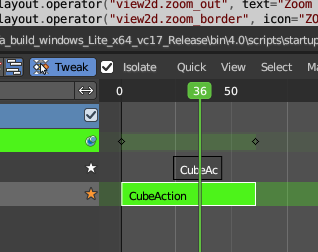
Allows you to edit the keyframe data within the Action strip while evaluating only Action clips located below the active track in the NLA stack. This mutes all tracks above the active Action clip track and only evaluates tracks below.
This tweak mode is similar to the one in the header but it allows you to insert keyframes and preserve the pose that you visually keyed while lower strips are evaluating only.
Note that Tweak Isolated Action and Tweak Action (Full Stack) is done from the header. And leaving the Tweak mode is for all methods evaluated in the header by clicking at the active Tweak button.