

































































Select Menu
The Movie Clip Editor is three editors in one. And the Clip editor in mask mode looks also different. So we need to explain the content for all editor types plus the Mask mode that has a Select menu.
Movie Clip Editor Modes

The Movie Clip Editor is three editors in one. And the Clip editor in mask mode looks also different. So we need to explain the content for all editor types plus the Mask mode that has a Select menu.
The Dope sheet mode has no Select menu.
Select Menu in Tracking mode in Clip sub mode
All
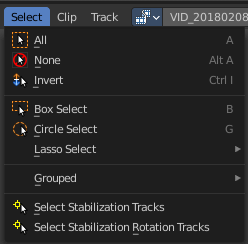
Select everything.
| Entry | What it does |
|---|---|
| None | Select nothing. |
| Inverse | Invert the current selection. |
| Box Select | Draw a rectangle to box select markers. It adds to selection by default. To subtract from selection hold down Shift key. |
| Circle Select | Circle select enters the Circle Select mode. This is a special select mode where you can select elements by moving with the mouse over it. It adds to selection by default. To subtract from selection hold down Shift key. To exit the Circle select click with the right mouse button. The pencil radius of the circle select tool can be adjusted with the scroll wheel. |
Lasso Select

A sub menu with the available lasso select modes.
Grouped
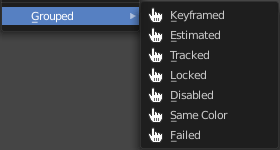
Here you can select objects that are in the same group by the chosen method. The items should be self explaining.
| Entry | What it does |
|---|---|
| Select Stabilization tracks | Select the tracks that are used for translation stabilization. |
| Select Stabilization Rotation tracks | Select the tracks that are used for rotation stabilization. |
Select Menu in Tracking mode in Graph sub mode
All
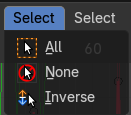
Select everything.
| Entry | What it does |
|---|---|
| None | Select nothing. |
| Inverse | Invert the current selection. |
Select Menu in Mask mode
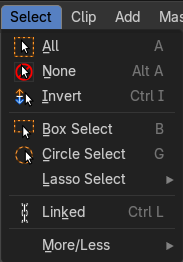
Note that you need to have a mask so that the content becomes active.
| Entry | What it does |
|---|---|
| All | Select everything. |
| None | Select nothing. |
| Inverse | Invert the current selection. |
| Box Select | Draw a rectangle to box select markers. It adds to selection by default. To subtract from selection hold down Shift key. |
| Circle Select | Circle select enters the Circle Select mode. This is a special select mode where you can select elements by moving with the mouse over it. It adds to selection by default. To subtract from selection hold down Shift key. To exit the Circle select click with the right mouse button. The pencil radius of the circle select tool can be adjusted with the scroll wheel. |
Lasso Select
A sub menu with the available lasso select modes.
| Entry | What it does |
|---|---|
| Linked | Select all curve points that are linked to the already selected points. |
| More/Less Submenu | More: Increase the selection by one point. · Less: Decrease the selection by one point. |