

































































Header
The Header contains various menus, navigation elements, settings and tools for the viewport. This content differs, dependent of the sub mode.
Image Editor - Header
The Header contains various menus, navigation elements, settings and tools for the viewport. This content differs, dependent of the sub mode.
The header is divided into two areas. Left mode and menus. Right settings.

Switch to UV / Image editor

Sometimes you want to switch from the UV Editor to the Image Editor. Or vice versa. To continue at the unwrap or to paint a texture.
This two editors are connected by a menu that allows exactly that. A button in each header that switches to the other editor.
Header right click menus
The general right click menu functionality is explained in chapter 6 Editors introduction.
Editortype Menu
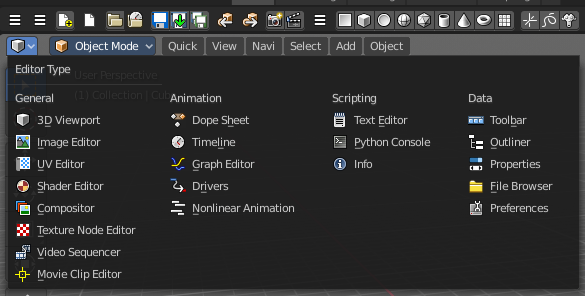
Bforartists is made of several editor types. Headers can display a menu where you can switch to other editor types.
This menu is hidden by default. It is meant to edit the layouts, and should not be necessary for regular work. You can reveal it in the header right click menu.
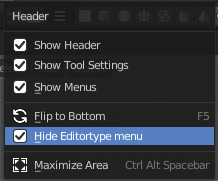
Sub Modes
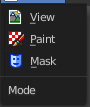
The Image Editor has three sub modes. View, Paint and Mask.
View Mode
It is as the name says a pure view mode. You can view your content.
Paint Mode
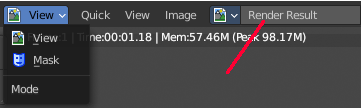
Paint mode allows to paint at your image material. The Paint mode is not available when you have a render result selected. You cannot paint at a render result. The render result is a special kind of image in this regards.
Mask Mode
This mode comes with masking functionality. You can mask out parts of the image.