

































































Select Menu
The Select menu contains various tools to select elements. The content is the same in all modes. With one exception. Grease Pencil mode is missing the More / Less menu items.
Graph Editor - Select Menu
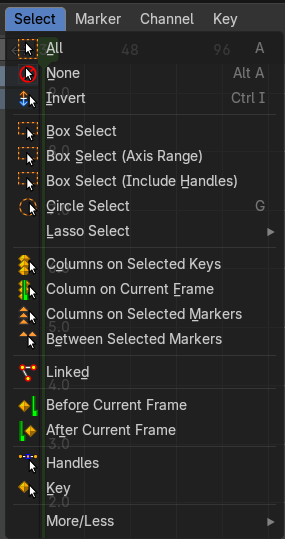
The Select menu contains various tools to select elements.
The content is the same in all modes. With one exception. Grease Pencil mode is missing the More / Less menu items.
| Entry | What it does |
|---|---|
| All | Select everything. |
| None | Select nothing. |
| Invert | Inverts the current selection. |
| Box Select | Box select enters the Border Select mode. Select elements by dragging a rectangle around it. Just what's inside of the rectangle gets selected then. It adds to selection by default. To subtract from selection hold down Shift key. The selection gets applied when you release the mouse. You leave the mode automatically when you release the mouse. |
| Box Select (Axis Range) | Box select enters the Border Select mode. Select elements by dragging a rectangle around it. And what's inside the horizontal range of the rectangle gets selected then. Even when the keyframes are outside of the rectangle. It adds to selection by default. To subtract from selection hold down Shift key. The selection gets applied when you release the mouse. You leave the mode automatically when you release the mouse. |
Box Select (Include Handles)
Box select enters the Border Select mode. Select elements by dragging a rectangle around it. And what's inside the horizontal range of the rectangle gets selected then. Even when the keyframes are outside of the rectangle. It includes also the handles.
It adds to selection by default. To subtract from selection hold down Shift key.
The selection gets applied when you release the mouse. You leave the mode automatically when you release the mouse.
Circle Select
Circle select enters the Circle Select mode. This is a special select mode where you can select elements by moving with the mouse over it. It adds to selection by default.
To subtract from selection hold down Shift key. To exit the Circle select click with the right mouse button.
The pencil radius of the circle select tool can be adjusted with the scroll wheel.
Lasso Select submenu

A sub menu with the available lasso select modes.
| Entry | What it does |
|---|---|
| Columns on Selected Keys | Select the keyframes in the columns of the currently selected keyframe. |
| Columns on Current Frame | Select the keyframes in the columns of the current frame. |
| Columns on Selected Markers | Select the keyframes in the columns of the selected markers. |
| Between Selected Markers | Select the keyframes between the selected markers. You need to have markers in the view for this feature. |
| Linked | Select all UV vertices linked to the active UV map. The previous selection gets cleared. |
| Before current Frame | Select the keyframes before the current frame. |
After current Frame
Select the keyframes after the current frame.
Last Operator Select Left/Right
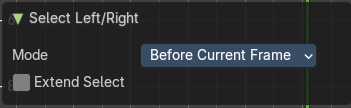
Mode
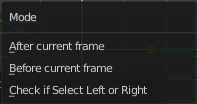
The selection mode to use.
Extend Select
Extend the current selection.
Handles
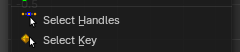
Selects the handles of the selected keyframes.
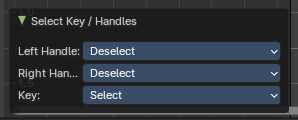
Last Operator Select Key / Handles
| Entry | What it does |
|---|---|
| Left Handle | What to do with the left handle, either select, deselect or keep selection status. |
| Right Handle | What to do with the right handle, either select, deselect or keep selection status. |
| Key | What to do with the center keyframe, either select, deselect or keep selection status. |
Key
Deselects the handles of the selected keyframes, only selecting the keyframe.
Last Operator Select Key / Handles
| Entry | What it does |
|---|---|
| Left Handle | What to do with the left handle, either select, deselect or keep selection status. |
| Right Handle | What to do with the right handle, either select, deselect or keep selection status. |
| Key | What to do with the center keyframe, either select, deselect or keep selection status. |
More/Less Sub-menu
| Entry | What it does |
|---|---|
| More | Grow the selection. |
| Less | Shrink the selection. |