

































































Channel Menu
This menu contains functionality to manage the channels in the channels list at the left. Here you manage channels and fcurve baking. You can also manage channel groups and other settings here.
Dopesheet Editor - Channel Menu
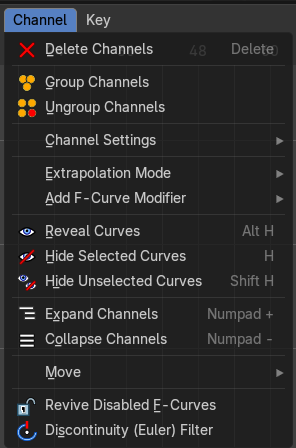
This menu contains functionality to manage the channels in the channels list at the left. Here you manage channels and fcurve baking. You can also manage channel groups and other settings here.
The menu doesn't exist in all modes. It exists in Dope sheet, Action Editor and Grease Pencil mode. And has different content.
Channel Menu - Dope sheet + Action Editor mode
| Entry | What it does |
|---|---|
| Delete Channels | Deletes the selected channels and all its keyframes. |
| Delete Invalid Drivers | Removes all invalid drivers. |
Group Channels
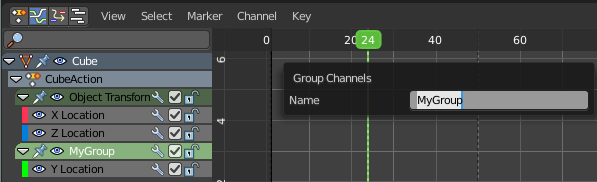
Creates a custom group from the selected channels.
Ungroup Channels
Removes the selected channels from the group, and adds them back to the original hierarchy.
Channel Settings
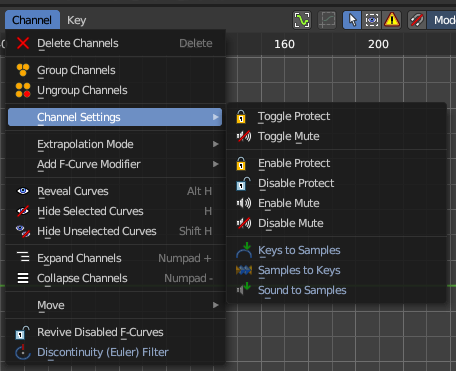
This sub menu adjusts the locks and check boxes in the channels list from outside of the channels list for all selected elements at once. With Toggle Mute you could, for example, disable all selected channels at once.
The menu items should be self explaining.
Toggle Protect
Toggles the locks in the channel list from their previous state to locked and back. This toggles all the selected channels’ editability to inverse its protected or unprotected state. This means whatever was protected, now is not protected – and whatever is unprotected is now protected. Consider this an inverse toggle.
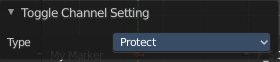
Last Operator Toggle Channel Settings
Type
The type to toggle.
| Entry | What it does |
|---|---|
| Toggle Mute | Toggles the checkbox in the channel list from the previous state to muted and back. This toggles all the selected channels’ influence to inverse its muted or unmutedstate. This means whatever was activated, now is muted, and whatever was de-activated is now un-muted. Consider this an inverse toggle. |
| Enable Protect | This sets the editability on the selected channels to be locked. This makes sue you cannot edit these channels. |
| Disable Protect | This sets the editability on the selected channels to be unlocked. This means you can now edit them. |
| Enable Mute | This sets the editability on the selected channels to be locked. This makes sue you cannot edit these channels. |
| Disable Mute | This sets the editability on the selected channels to be unlocked. This means you can now edit them. |
Add F-Curve Modifier
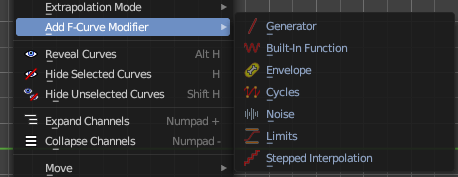
This group of operators addes modifiers to the the selected curve channel. This is useful for procedural animation. To access the modifier stack, open the Property Shelf and switch to the Modifier tab.
| Entry | What it does |
|---|---|
| Generator | Generator creates a polynomial function. These are basic mathematical formulas that represent lines, parabolas, and other more complex curves, depending on the values used. |
| Built-In Function | These are additional formulas, each with the same options to control their shape. |
| Envelope | Allows you to adjust the overall shape of a curve with control points. |
| Cycles | Cycles allows you add cyclic motion to a curve that has two or more control points. The options can be set for before and after the curve. |
| Noise | Modifies the curve with a noise formula. This is useful for creating subtle or extreme randomness to animated movements, like camera shake. |
| Limits | Limit curve values to specified X and Y ranges. |
| Stepped Interpolation | Gives the curve a stepped appearance by rounding values down within a certain range of frames. |
Extrapolation Mode
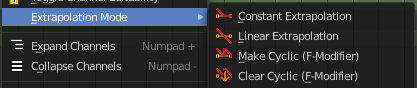
Sets the extrapolation mode for the selected F-Curves. Means how the curve acts at the beginning and the end of the F-Curve.
| Entry | What it does |
|---|---|
| Constant Extrapolation | The animation curve continues straight at the end. |
| Linear Extrapolation | The animation curve continues the last direction. |
| Make Cyclic | Makes the animation loopable. The interpolation curves are adjusted so that the first frame fits to the last frame. |
| Clear Cyclic | Removes the cyclic extrapolation. |
Last Operator Set Keyframe Interpolation
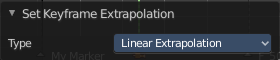
Type
Set the extrapolation mode for the selected F-Curves.
Reveal Curves
Reveals all hidden curves.
Last Operator Reveal Curves

Select
Select all revealed curves.
Hide selected Curves
Hides the selected curves.
Hide unselected curves
Hides the unselected curves.
Last Operator Hide Curves

Unselected
Hide the unselected or selected curves.
Expand Channels
Expands all channels in the channel list.
Last Operator Expand Channels
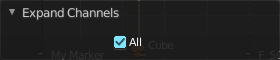
All
Expand all Channels, or just the selected channels.
Collapse Channels
Collapses all channels in the channels list.
Last Operator Collapse Channels
All
Collapse all Channels, or just the selected channels.
Move
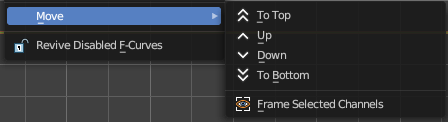
Sort the items in the channels list.
Last Operator Move Channels
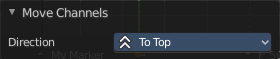
Direction
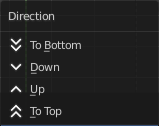
Sort the items in the channels list.
Frame selected Channels
Centers the view at the selected channels.
| Entry | What it does |
|---|---|
| Revive Disabled F-Curves | Clears the disabled tag from all f-curves to get broken F-Curves working again. |
| Discontinuity (Euler) Filter | Try to fix large jumps and flips in the selected F Curve. This jumps can appear when rotation values are clipping by baking physics. |