

































































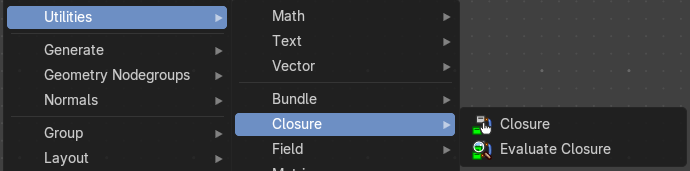
Add Menu - Utilities - Closure
Vector nodes are for calculating vector operations.
Add menu - Closure
Vector nodes are for calculating vector operations.
Closures allow you to pass custom logic into node groups—like injecting a mini-function or behavior block. They’re ideal for creating reusable, pluggable systems where the user can define part of the logic externally.
Closure Zone
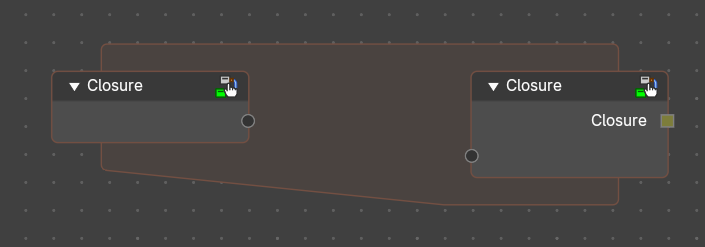
The closure function to be executed.
Purpose
Defines logic that will be injected into a node group or node tree. Think of it as a sandbox where the user builds a mini-node tree that gets executed when the closure is evaluated during the execution of another node tree.
A Closure encapsulates the logic defined in the Closure Zone. This output is typically connected to an Evaluate Closure node inside a node group or injected into another node tree.
Use Cases:
- Custom deformation logic injected into a reusable node group.
- Procedural scattering patterns defined externally.
- Field-based attribute manipulation with user-defined formulas.
- Behavior overrides for geometry processing pipelines.
Behavior
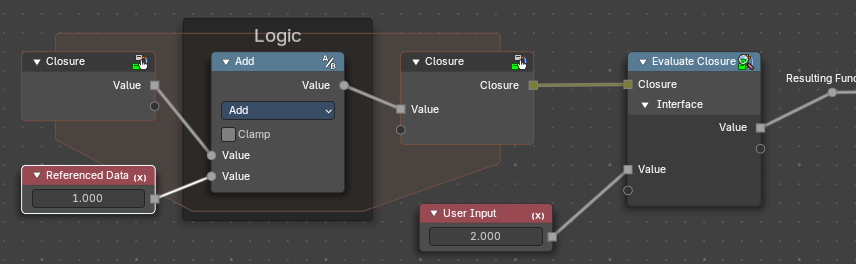
The Closure Node creates a Closure Zone—a subgraph where the logic is built using the declared inputs. This zone behaves like a function.
- Closure Inputs appear as sockets at the top of the zone. Data from outside the zone can also be referenced.
- Outputs are defined using Closure output nodes.
<!-- -->
- The logic inside is encapsulated and only runs when evaluated externally.
How It Works (Conceptually)
- Authoring: You define a Closure Zone with custom logic (e.g., a tree scattering pattern).
- Packaging: The Closure node wraps that logic into a closure line.
- Injection: Inside a node group or elsewhere in a node tree, the Evaluate Closure node pulls in that logic and runs it with the provided inputs.
- Modularity: You can swap closures to change behavior without modifying the node tree or nodegroup itself.
When the node group containing an Evaluate Closure node runs, it pulls in the logic from the Closure Zone and executes it in place. The zone is not executed immediately—it’s stored as a callable block.
Requirements
Input and output names in the Closure Zone must match those expected by the Evaluate Closure node.
Can include any Geometry Nodes logic, including fields, math, distribution patterns, etc.
Properties
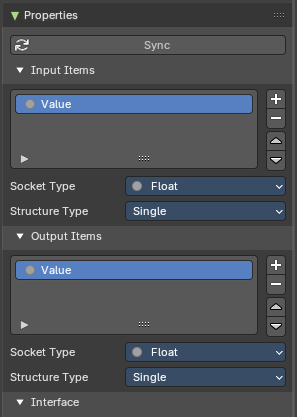
These panel defines the parameters that the closure will pass when evaluated. Each item becomes a socket in the Closure Zone.
You can access these properties in the sidebar to the right in the Node tab.
| Entry | What it does |
|---|---|
| Sync Button | Updates the sockets to what is actually used from a Closure Zone, meaning the input/output sockets update to what is evaluated in the logic of the closure automatically. Useful to not do this manually. |
| Input Items | Parametersofvalues passed into the Closure logic (e.g., geometry, fields, values) for user customizability. |
| Output Items | Whatever parameters the Closure logic returns—could be geometry, fields, instances, values, etc |
| Common Properties | Add / Remove / Reorder Controls: + (Add): Creates a new input socket. – (Remove): Deletes the selected input. ↑ / ↓ (Reorder): Adjusts the order of inputs for visual clarity and UX consistency. · Name: Identifier for the input. Must match the name used in Evaluate Closure. · Socket Type: Data type of the input (e.g., Float, Vector, Boolean, Geometry, Field). · Structure Type: Defines how the input is treated: Auto, Dynamic, Field, Grid, List, or Single. |
Evaluate Closure
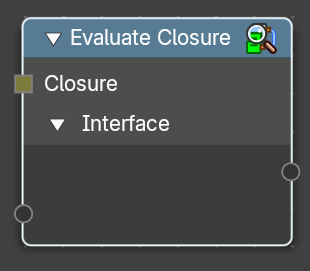
This node calls the logic stored in the Closure object.
It passes in the provided parameters and returns the result of the closure’s internal node tree. Execution is deferred—the logic only runs when this node is evaluated in the context of the node group.
| Entry | What it does |
|---|---|
| Closure Input | A Closure socket input created by a Closure zone. This contains the logic to be executed from that Closure zone. |
| Interface Inputs / Outputs | Named inputs/outputs from the Closure properties that match the Closure Zone’s expected parameters for the enclosed logic to be evaluated. |
Properties
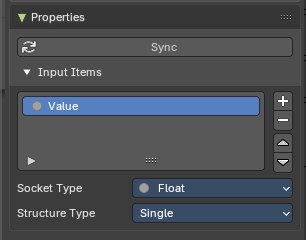
This panel defines the parameters that the closure will accept when evaluated. Each item becomes a socket in the Closure Zone.
You can access these properties in the sidebar to the right in the Node tab.
| Entry | What it does |
|---|---|
| Sync Button | Updates the sockets to what is actually used from a Closure Zone, meaning the input/output sockets update to what is evaluated in the logic of the closure automatically. Useful to not do this manually. |
| Add / Remove / Reorder Controls | + (Add): Creates a new input socket. – (Remove): Deletes the selected input. ↑ / ↓ (Reorder): Adjusts the order of inputs for visual clarity and UX consistency. |
| Name | Identifier for the input. Must match the name used in Evaluate Closure. |
| Socket Type | Data type of the input (e.g., Float, Vector, Boolean, Geometry, Field). |
| Structure Type | Defines how the input is treated: Auto, Dynamic, Field, Grid, List, or Single. |