

































































Add Menu - Mesh - Write
These are nodes for working with Mesh data.
Add menu - Mesh - Write

These are nodes for working with Mesh data.
Set Mesh Normal
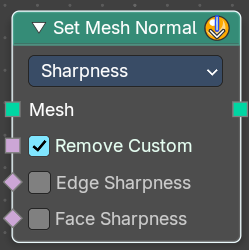
The Set Mesh Normal node is used to modify custom normals on a mesh, providing control over shading smoothness and surface appearance. This is useful for adjustingnormalsmoothness, sharp edges, and tangent-based effects
Input
Mesh
Input mesh.
Properties
Mode
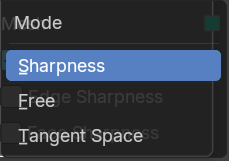
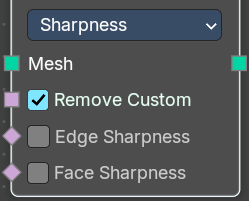
Sharpness
Controls the intensity of edge sharpness. Higher values create stronger shading contrasts between faces.
Store the sharpness of each face or edge. Similar to the "Shade Smooth" and "Shade Flat" operators.
| Entry | What it does |
|---|---|
| Remove Custom | Removes custom normals previously set by the user on the original mesh data when enabled. |
| Edge Sharpness | Sets the normal sharpness to the edge domain to “flat”. |
| Face Sharpness | Sets the normal sharpness to the face domain to “flat”. |
Free
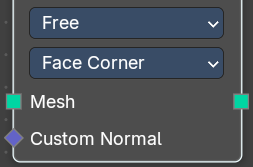
Allows direct manipulation of normals as free vectors, rather than constrained by geometry. Useful for custom shading effects and non-destructive normal adjustments.
Domain
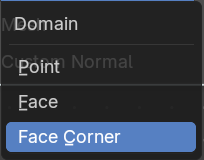
Attribute domain to store the free custom normals.
- Point
- Face
- Face Corner
Note: Default object normals are stored to Facecorner, this will “pass-through” the normal data. Face normals will make “flat” sharp edges.
Tangent Space
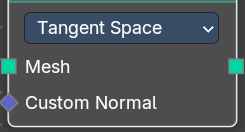
Adjusts normals relative to the surface tangentto store the source meshes normals.Storesnormals in a deformation dependent custom transformation space.
Note: This method is slower, but can be better when subsequent operations change the mesh without handling normals specifically.
Custom Normal
Vector Field based on the normal.
Outputs
Geometry
Geometry output.
Got it! Here's the documentation for the Set Mesh Normal node:
Set Shade Smooth
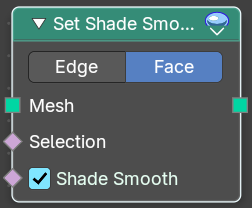
Retrieves if the geometry is shaded smooth.
Input
| Entry | What it does |
|---|---|
| Geometry | Input mesh. |
| Selection | A selection of the input mesh. |
| Shade Smooth | Set the shading to smooth. |
Properties
Domain
| Entry | What it does |
|---|---|
| Edge | Set Edge to smooth. |
| Face | Set Face to smooth |
Outputs
Geometry
Geometry output.