
































































Editors

Add Menu - Mesh - Sample
Nodes to modify the mesh geometry.
Add menu - Mesh - Sample

Nodes to modify the mesh geometry.
Sample Nearest Surface
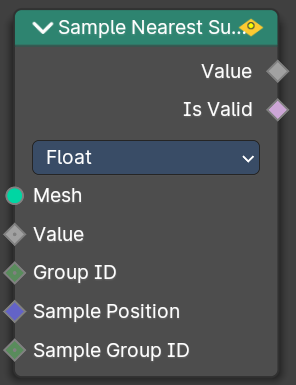
Calculate the interpolated value of a mesh attribute on the closest point of its surface.
Inputs
| Entry | What it does |
|---|---|
| Mesh | Input mesh. |
| Value | The value to calculate. |
| Group ID | Is evaluated on the face domain, and splits the input mesh into multiple parts, each with its own id. |
| Sample Position | The sample position to calculate. |
| Sample Group ID | Determines in which group the closest nearest surface is detected. |
Properties
Data Type
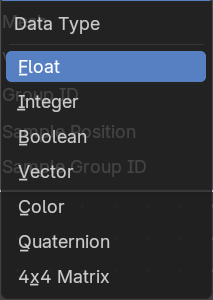
Which data to calculate.
Outputs
| Entry | What it does |
|---|---|
| Value | The output value. |
| Is Valid | Wether the sampling was successful. It is false when the sampled group is empty. |
Sample UV Surface
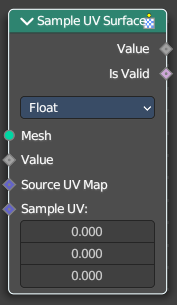
Calculate the interpolated value of a mesh attribute at a UV coordinate.
Inputs
| Entry | What it does |
|---|---|
| Mesh | Input mesh. |
| Value | The value to calculate. |
| Source UV Map | The input UV map. |
| Sample UV | The sample position to calculate. |
Properties
Data Type
Which data to calculate.
Outputs
| Entry | What it does |
|---|---|
| Value | The output value. |
| Is Valid | Wether the node could find a single face to sample at the uv coordinate. |