

































































Add Menu - Input - Scene
Here you find input nodes.
Add menu - Input - Scene
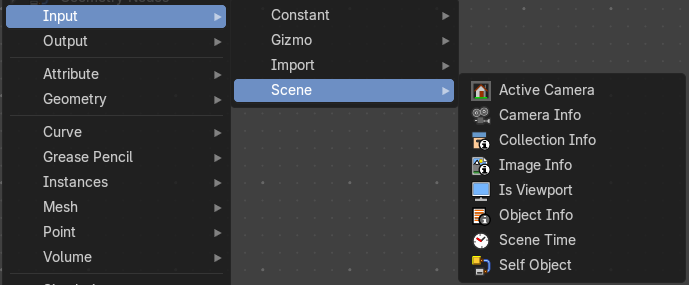
Here you find input nodes.
Active Camera
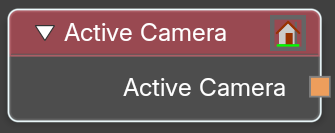
The node outputs the the scene's current active camera.
Typical usage would be to connect this node to an Object Info node to
obtain its transform.
Outputs
Active Camera
The active camera.
Camera Info
The node outputs settings from the chosen camera.
Typical usage would be to connect this node to an Object Info node to
obtain its transform.
| Entry | What it does |
|---|---|
| Inputs | Camera: The camera object. |
| Outputs | — |
| Projection Matrix | The projection matrix. |
| Focal length | The focal length. |
| Sensor | The sensor size. |
| Shift | The camera shift. |
| Clip Start | The camera near clipping distance. |
| Clip End | The camera far clipping distance. |
| Focus Distance | Distance to the focus point for depth of field. |
| Is Orthographic | If the camera is using orthographic view. |
| Orthographic Scale | The orthographic camera scale in case it is using Orthographic view. |
Collection Info
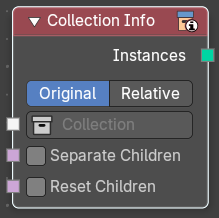
The Collection Info node retreives information from collections. This can be useful to use an external collection to control parameters in the geometry node tree.
Inputs
| Entry | What it does |
|---|---|
| Collection | Collection to get the properties from. |
| Separate Children | Output each child of the collection as a separate instance. The output is sorted alphabetically. · Reset Children: Reset the transform of every child instance in the output. This setting is just active when Separate Children is active. |
| Entry | What it does |
|---|---|
| Properties | Transform Space: The transformation of the geometry outputs. · Original: Output the geometry relative to the collection offset. · Relative: Bring the input collection geometry into the modified object, maintaining the relative position between the objects in the scene. |
| Outputs | Geometry: Geometry of the collection in world space with all its modifiers applied. |
Image Info
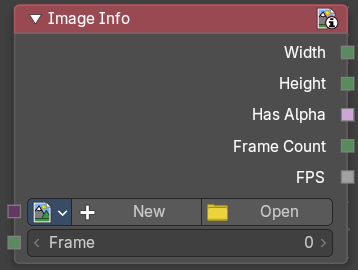
Retreive infos from an image.
Input
Image
Load or connect a image.
New
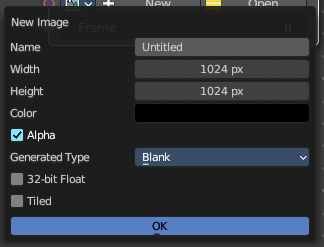
Create a new image.
Opens a new image dialog where you can adjust the color, size and further settings.
Open
Open a existing image.
Image prop
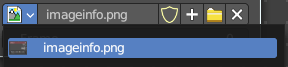
| Entry | What it does |
|---|---|
| Image browser | A list of available images |
| Image name | The name of the image |
| Fake user | Add a fake user to this asset. |
New
Create a new image.
Opens a new image dialog where you can adjust the color, size and further settings.
| Entry | What it does |
|---|---|
| Open Image | Open a existing image. |
| Remove | Removes the image as the active image. |
Frame
For videos. Which frame to use.
Outputs
| Entry | What it does |
|---|---|
| Width | The width of the image. |
| Height | The height of the image |
| Has Alpha | Returns true if the image has an alpha channel |
| Frame Count | For movies. How many frames. |
| FPS | For movies, what FPS rate. |
Is Viewport
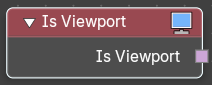
The Is Viewport node outputs true when geometry nodes is evaluated for the viewport. For the final render the node outputs false.
Outputs
Is Viewport
A booleran that indicates if the geometry nodes is evaluated for preview.
Object Info
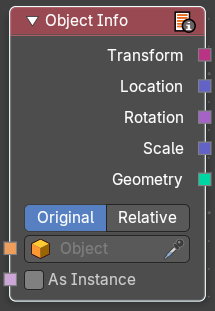
The Object Info node retreives information from objects. And outputs it then.
| Entry | What it does |
|---|---|
| Inputs | Object: Object to get the properties from. |
| Outputs | Transform: Transform matrix output. · Location: Location of the object in world space. · Rotation: Rotation of the object in world space. · Scale: Scale of the object in world space. · Geometry: Geometry of the object in world space with all its modifiers applied. |
Scene time
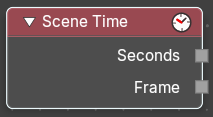
Outputs the current scene time in seconds or in frames.
The Frame output is a float value to make subframe rendering for motion
blur possible.
Outputs
| Entry | What it does |
|---|---|
| Seconds | Output in seconds. |
| Frame | Output in Frames. |
Self Object
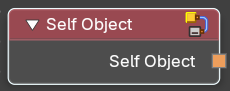
Retreives the parent object of the geometry nodegroup.