

































































Add Menu - Group
Node groups allows you to group different nodes of the ndoetree together to reduce the visual complexity. A node group acts like any other node with inputs, properties and outputs.
Add menu - Group
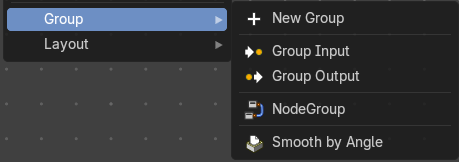
Node groups allows you to group different nodes of the ndoetree together to reduce the visual complexity. A node group acts like any other node with inputs, properties and outputs.
If you include a source node in your group, you will end up having the source node appearing twice: once inside the group, and once outside the group in the new node tree.
If you include an input/output node in the group, there will not be an input/output socket available from the group.
Note: The icons will show what state the nodegroup is in, either in a Nodegroup state (used in file), Forced User state (saved in file even if not used), Asset state (stored to the Asset Browser) or Overridden/Linked state (referenced from another file).
| Entry | What it does |
|---|---|
| Add Empty Group | Add an empty node group, with no other nodes in the node group. |
| Group Input | Adds a Group Input node. This node is usually already part of a new created group. |
| Group Output | Adds a Group Output node. This node is usually already part of a new created group. |
| Smooth by Angle | An example node group. |
List of Node Groups
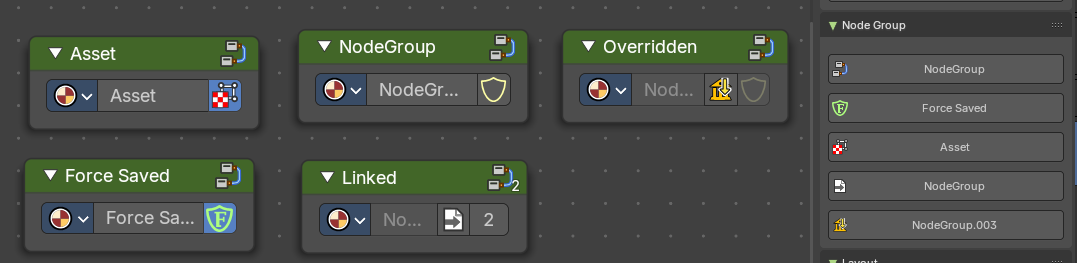
Once you have created a node group it will also show up in the Group menu.
Each nodegroup can have differing states and will show a relevant icon.
These icons and labels represent the status and behavior of node groups in your asset browser or node editor. Each state reflects how the node group is stored, linked, or overridden in your project.
- **Node Group: **A standard node group created and saved within the current file.
- Asset: This node group is marked as an Asset, meaning it's reusable across projects and stored in the Asset Browser.
- **Force Saved: **The node group has been force-saved, ensuring it persists even if unused.
- **Linked: **The node group is linked from an external file and used multiple times.
- Overridden: The node group is linked from another file but has been overridden locally.
Groups can be inserted and referenced to other node trees too. They can also be duplicated or duplicated linked. When they are duplicate linked, this means the node references the same node group multiple times.