

































































Add Menu - Color
Here you find mainly nodes to convert color values.
Add menu - Utilities - Color
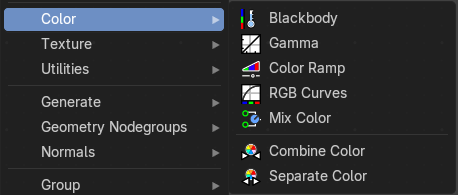
Here you find mainly nodes to convert color values.
Blackbody
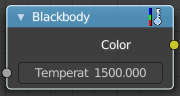
The Blackbody node converts a blackbody temperature to RGB value. This can be useful for materials that emit light at natural occurring frequencies.
| Entry | What it does |
|---|---|
| Inputs | Temperature: The temperature in Kelvin. |
| Outputs | Color: RGB color output. |
Gamma
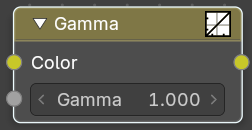
Apply a gamma correction.
| Entry | What it does |
|---|---|
| Inputs | Color: RGB Color input. · Gamma: The gamma correction value. 1 is unchanged. |
| Outputs | Color: RGB color output. |
Color Ramp
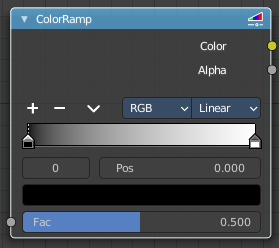
The Color Ramp Node is used for mapping values to colors with the use of a gradient.
Inputs
Factor
The Factor input is used as an index for the color ramp.
Properties
Color Ramp
Color Ramps enables the user to specify a range of colors based on color stops. The color between the color stops gets interpolated.
Controls
| Entry | What it does |
|---|---|
| + | Add a stop to your color ramp. The stop will be added after the selected one, in the middle to the next one. |
| - | Deletes the selected color stop from the list. |
Tools menu
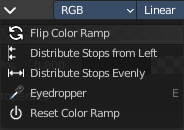
| Entry | What it does |
|---|---|
| Flip Color Ramp | Flips the gradient, inverting the values of the color ramp. |
| Distribute Stops from Left | Rearrange the stops so that every step has the same space to the right. |
| Distribute Stops Evenly | Space between all neighboring stops becomes equal. |
| Eyedropper (pipette icon) E | An Eyedropper to sample a color or gradient from the interface to be used in the color ramp. |
Reset Color Ramp
Resets the color ramp to its default state.
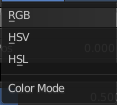
Color Mode
| Entry | What it does |
|---|---|
| RGB | Blends color by mixing each color channel and combining. |
| HSV/HSL | Blends colors by first converting to HSV or HSL, mixing, then combining again. This has the advantage of maintaining saturation between different hues, where RGB would de-saturate, this allows for a richer gradient. |
Interpolation
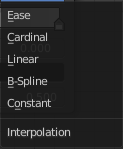
| Entry | What it does |
|---|---|
| Ease | Uses an Ease Interpolation for the color stops. |
| Cardinal | Uses a Cardinal Interpolation for the color stops. |
| Linear | Uses a Linear Interpolation for the color stops. |
| B-Spline | Uses a B-Spline Interpolation for the color stops. |
| Constant | Uses a Constant Interpolation for the color stops. |
Color Ramp

The color band. A click at one of the color stops makes it the active one. You can move the color stops by clicking at them and dragging them around.
Active Color Stop elements
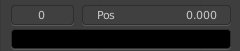
Adjust the active color stop.
| Entry | What it does |
|---|---|
| Choose active color stop | Choose the color stop by index. |
| Pos | The position of the active color stop. The range goes from 0.000 to 1.000 |
Outputs
| Entry | What it does |
|---|---|
| Image | Standard image output. |
| Alpha | Standard Alpha Output. |
RGB Curves
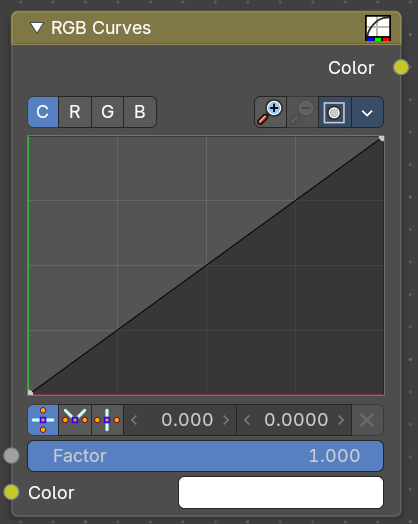
Adjust the RGB channels by curves.
Input
| Entry | What it does |
|---|---|
| Factor | The blend factor. |
| Color | The input color. |
RGB Curve
C R G B
The color channels.
Selecting Points
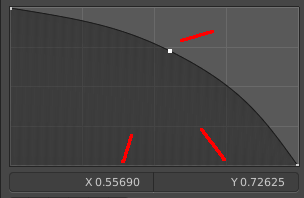
You can select curve points. This reveals two edit boxes for the x and y coordinate of this point.
Selected points can be moved around. Left click at them, hold the mouse button down and move them to a new location.
Adding Points
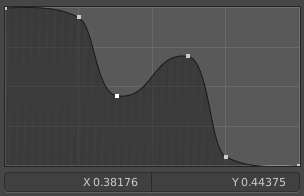
You can add new curve points by simply left clicking at the curve. Move the mouse to position them where you need it.
Navigation elements
| Entry | What it does |
|---|---|
| Zoom in | Zooms in. |
| Zoom out | Zooms out. |
Clipping options
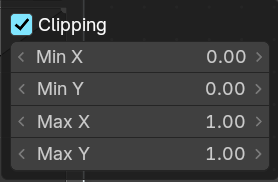
Set up clipping for the stroke.
Tools
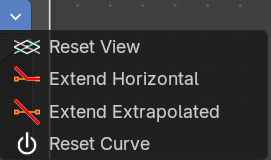
Tools is a menu where you can find some curve related tools.
| Entry | What it does |
|---|---|
| Reset View | Resets the curve windows zoom. |
| Extend Horizontal | Extend the curve before the first and after the last point horizontal. |
| Extend Extrapolated | Extend the curve before the first and after the last point extrapolated. |
| Reset Curve | Resets the curve to the initial shape. |
Handles

You can choose between Auto handle, Vector Handle and Auto Clamped.
| Entry | What it does |
|---|---|
| Position X / Y | The position of the selectedc curve point. |
| Delete Points | Deletes the selected curve point. |
Output
Color
The rgb output.
Mix Color
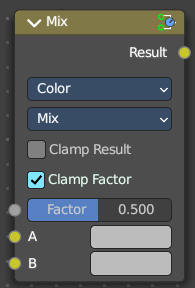
The mix Color node is in real the Mix node in Color mode. It is shared across editors.
The Mix node is meant to mix values. This can be colors, or also a vector or a single value.
Note that the Mix Color node does not start in Color mode when you insert it from the sidebar due a techical limitation in the Blender Python api. Here you have to manually switch to the color mode.
Inputs
| Entry | What it does |
|---|---|
| Factor | Controls the amount of influence the node exerts on the output image. |
| A | Usually the background image. The image size and resolution sets the dimensions of the output image. |
| B | Usually he foreground image. |
Properties
Data Type
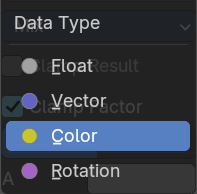
The mode in which the node works.
Blending Mode
Mix
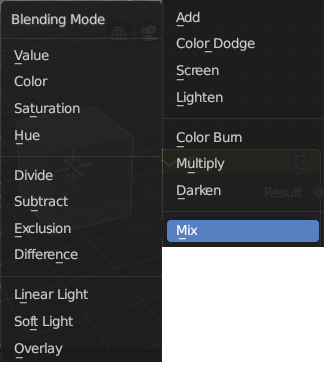
Choose the different blending modes.
Add, Subtract, Multiply, Screen, Divide, Difference, Darken, Lighten, Overlay, Color Dodge, Color Burn, Hue, Saturation, Value, Color, Soft Light, Linear Light.
| Entry | What it does |
|---|---|
| Clamp Result | Clamp the result to 0, 1 range. |
| Clamp Factor | Clamp the factor to 0, 1 range. |
| Outputs | Result: Standard output. |
Combine Color
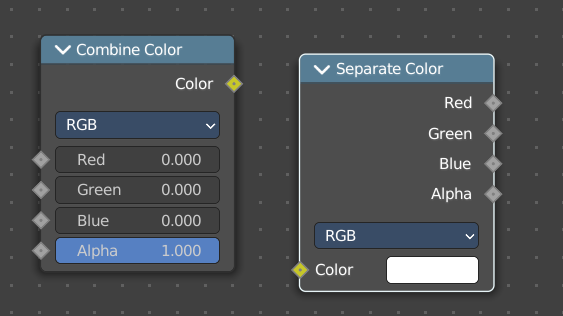
Combine the single RGBA channels into a single image.
Input
Mode
- RGB colour processing
- HSV colour processing
- HSL colour processing
| Entry | What it does |
|---|---|
| Input – RGB mode | R, G and B: The red, green and blue channels of an image. |
| Input – HSV mode | H , S and V: The Hue, Saturation and Value channels of an image. |
| Input – HSL mode | H , S and L: The Hue, Saturation and Luminescence channels of an image. |
Outputs
Color
The rgba output color.
Separate Color
Combine the single RGBA channels into a single image.
Input
Mode
- RGB colour processing
- HSV colour processing
- HSL colour processing
Image
The image input.
Output
| Entry | What it does |
|---|---|
| Red, Green, Blue and Alpha | The red, green, blue and alpha channels of an image in RGB mode. |
| Hue Saturation Value Alpha | The Hue Saturation Value Alpha channels in HSV mode. |
| Hue Saturation Lightness Alpha | The Hue Saturation Lightness Alpha channels in HSL mode. |