

































































Options Tab
In the Options tab you will find general options for performance. The Performance panel provides you with settings that improves the performance and how the compositor renders. Here you can get faster results.
Options Tab - Performance panel
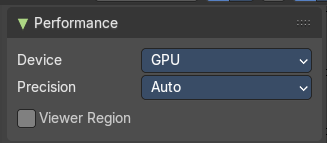
In the Options tab you will find general options for performance. The Performance panel provides you with settings that improves the performance and how the compositor renders. Here you can get faster results.
Device
The hardware device used to render the image.
CPU
Uses the CPU to calculate.
GPU
Uses the GPU to calculate, which uses parallel processing for near real time results.
Precision
The quality and precision of the compositor intermediate results when editing the image.
Auto
Automatically optimizes the precision dynamically.
Full
Final quality precision.
Viewer Region
Use boundaries for viewer nodes and composite backdrop.