

































































Mesh - Particle Edit Mode
You can attach a particle system to a mesh object. And then you can switch to a Particle Edit Mode.
Tool Shelf - Mesh - Particle Edit Mode
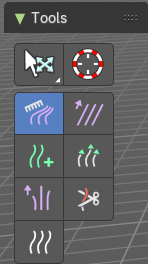
You can attach a particle system to a mesh object. And then you can switch to a Particle Edit Mode.
This mode allows you to edit the particles. In the tool shelf you will find several brushes. These brushes are of use for particles of type hair. They can be combed, cut etc. .
Select and 3D Cursor tools
Select tools group and 3D Cursor are explained in the chapter 7.1.1 Editors - 3D View - Tool Shelf - Object Mode. We won't cover this tools again here.
Hotkeys
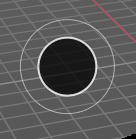
Pressing F allows you to change the brush size onscreen. Drag the mouse to increase or decrease the size. Left click applies the new size, right click cancels the resizing.
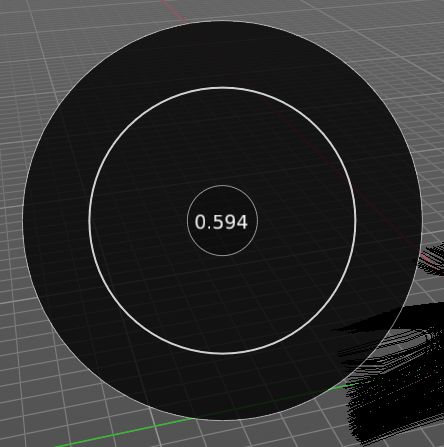
Pressing Shift F allows you to change the strength of the brush. Drag the mouse to increase or decrease the size. Left click applies the new size, right click cancels the resizing.
Comb
Allows you to comb the strands of the particle system.
Tool Settings
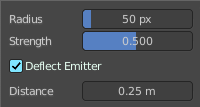
| Entry | What it does |
|---|---|
| Radius | The brush radius. The button behind the edit box allows you to set the radius by mouse move. This is a hotkey tool, and should be performed in the viewport. |
| Strength | The brush strength. The button behind the edit box allows you to set the radius by mouse move. This is a hotkey tool, and should be performed in the viewport. |
| Deflect Emitter | Prevent paths to intersect the emitter mesh geometry. |
| Distance | The distance to keep particles away from the emitter mesh geometry. |
Smooth
Allows you to smooth the strands of the particle system.
Tool Settings
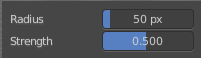
| Entry | What it does |
|---|---|
| Radius | The brush radius. The button behind the edit box allows you to set the radius by mouse move. This is a hotkey tool, and should be performed in the viewport. |
| Strength | The brush strength. The button behind the edit box allows you to set the radius by mouse move. This is a hotkey tool, and should be performed in the viewport. |
Add
Allows you to add strands to the particle system.
Tool Settings
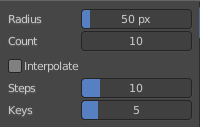
| Entry | What it does |
|---|---|
| Radius | The brush radius. The button behind the edit box allows you to set the radius by mouse move. This is a hotkey tool, and should be performed in the viewport. |
| Count | The amount of strands. |
| Interpolate | Interpolate new particles from the existing ones. |
| Steps | Brush steps. Steps is connected with Interpolate. |
| Keys | How many keys to make new particles with. |
Length
Manipulate the length of the strands.
Tool Settings
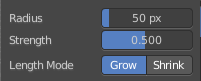
| Entry | What it does |
|---|---|
| Radius | The brush radius. The button behind the edit box allows you to set the radius by mouse move. This is a hotkey tool, and should be performed in the viewport. |
| Strength | The brush strength. The button behind the edit box allows you to set the radius by mouse move. This is a hotkey tool, and should be performed in the viewport. |
| Length Mode | Grow or shrink the particles. |
Puff
Manipulate the volume of the strands.
Tool Settings
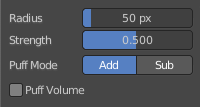
| Entry | What it does |
|---|---|
| Radius | The brush radius. The button behind the edit box allows you to set the radius by mouse move. This is a hotkey tool, and should be performed in the viewport. |
| Strength | The brush strength. The button behind the edit box allows you to set the radius by mouse move. This is a hotkey tool, and should be performed in the viewport. |
| Add / Sub | Add or subtract to the current volume. |
| Puff Volume | Apply Puff to unselected end points. |
Cut
Cut away particles.
Tool Settings
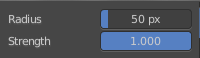
| Entry | What it does |
|---|---|
| Radius | The brush radius. The button behind the edit box allows you to set the radius by mouse move. This is a hotkey tool, and should be performed in the viewport. |
| Strength | The brush strength. The button behind the edit box allows you to set the radius by mouse move. This is a hotkey tool, and should be performed in the viewport. |
Weight
Manipulate the weight of the strands.
Tool Settings
| Entry | What it does |
|---|---|
| Radius | The brush radius. The button behind the edit box allows you to set the radius by mouse move. This is a hotkey tool, and should be performed in the viewport. |
| Strength | The brush strength. The button behind the edit box allows you to set the radius by mouse move. This is a hotkey tool, and should be performed in the viewport. |