
































































Editors

Hair Curve - Sculpt mode - Curves menu
Move curves to the nearest deformed surface so that the first point is exactly on the surface mesh. This re-attaches the curves to a deformed surface using the existing attachment information.
Sculpt mode - Curves menu
Snap to Deformed Surface
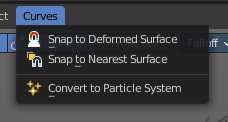
Move curves to the nearest deformed surface so that the first point is exactly on the surface mesh. This re-attaches the curves to a deformed surface using the existing attachment information.
This only works when the topology of the surface mesh has not changed.
| Entry | What it does |
|---|---|
| Snap to Nearest Surface | Move curves to the nearest surface so that the first point is exactly on the surface mesh. This finds the closest point of the surface of the root point of every curve and moves the root there. |
| Convert to Particle System | Add a new or update an existing hair particle system on the surface object. The new Particle System is the legacy hair system. This does not remove the hair curve object, but creates/updates a new Particle System. |