
































































Editors

Mesh Object - Weight Paint Mode - Brushes context menus
Call this menu with right click in the 3D viewport. You need to be in Weight Paint mode with a mesh object.
Brushes context menus
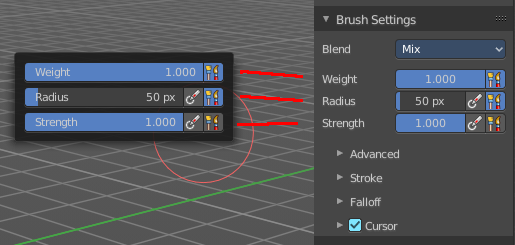
Call this menu with right click in the 3D viewport. You need to be in Weight Paint mode with a mesh object.
In Weight Paint mode you will call a context menu with the sliders from the Brush settings.
| Entry | What it does |
|---|---|
| Weight | Adjust the strength of the weight painting. · Size Pressure: The first button behind the edit box enables tablet pressure sensitivity for radius. |
| Radius | The Radius edit box allows you to adjust the radius of the brush. · Size Pressure: The first button behind the edit box enables tablet pressure sensitivity for radius. · Use Unified Radius: The second button behind the edit box enables global radius size. Any modification at the radius will also modify the radius value for other paint tools. |
| Strength | The Strength edit box allows you to adjust the strength of the brush. · Size Pressure: The first button behind the edit box enables tablet pressure sensitivity for radius. · Use Unified Radius: The second button behind the edit box enables global radius size. Any modification at the radius will also modify the radius value for other paint tools. |