

































































Mesh Object - Sculpt Mode - Brushes context menus
Call this menu with right click in the 3D viewport. You need to be in Sculpt mode with a mesh object.
Brushes context menus
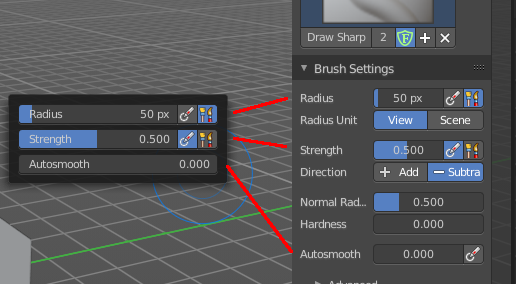
Call this menu with right click in the 3D viewport. You need to be in Sculpt mode with a mesh object.
In Sculpt mode you will call a context menu with the sliders from the Brush settings. The content depends of the chosen brush. Every brush has different settings. We just cover the usual ones here. For the brush specific settings see the chapter Editors - 3D View - Tool Shelf - Mesh - Sculpt Mode
Radius
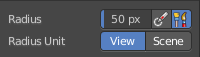
The Radius edit box allows you to adjust the radius of the brush.
| Entry | What it does |
|---|---|
| Size Pressure | The first button behind the edit box enables tablet pressure sensitivity for radius. |
| Use Unified Radius | The second button behind the edit box enables global radius size. Any modification at the radius will also modify the radius value for other paint tools. |
Strength
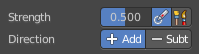
The Strength edit box allows you to adjust the strength of the brush.
| Entry | What it does |
|---|---|
| Size Pressure | The first button behind the edit box enables tablet pressure sensitivity for radius. |
| Use Unified Radius | The second button behind the edit box enables global radius size. Any modification at the radius will also modify the radius value for other paint tools. |
Auto smooth
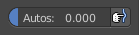
The auto smooth edit box allows you to adjust the amount of smoothing that gets automatically applied to each stroke.
Tablet Pressure
The button behind the edit box enables tablet pressure sensitivity for auto smooth.
Plane Offset

Clay brush setting. Adjust the plane on which the brush acts towards or away from the objects surface. Sculpting with the Clay brush happens in a plane defined by the view you are in and the first vertices hit by the brush.
Distance
Adjust the plane trim distance.
Height

Layer brush setting. The height that can be affected by the layer brush.
Magnify

Blob Brush setting. The Crease Brush Pinch Factor.
Pinch

Crease Brush setting. The Crease Brush Pinch Factor.
Normal Weight

Various brushes like Grab or Elastic Deform. How much grab will pull vertexes out of surface during grab.
Magnify
Blob Brush setting. The Crease Brush Pinch Factor.
Rake

Snake Hook brush setting. How much grab will follow cursor rotation.