
































































Editors

Grease Pencil object - Draw Mode - Brushes context menu
Call this menu with double right click in the 3D viewport. You need to be in Draw mode with a grease pencil object.
Draw Mode - Brushes Context Menu
Call this menu with double right click in the 3D viewport. You need to be in Draw mode with a grease pencil object.
In Draw mode you will call a context menu with the sliders from the Brush settings.
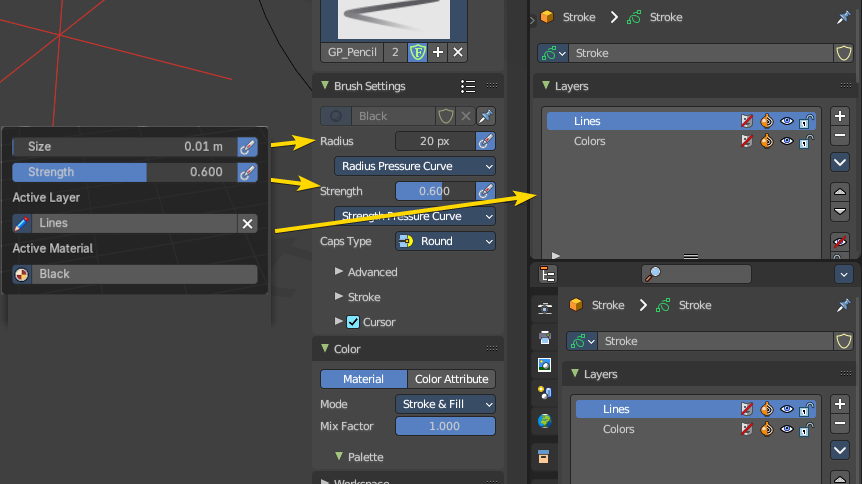
| Entry | What it does |
|---|---|
| Radius | The radius of the sculpt brush. |
| Strength | The strength of the sculpt brush. |
Active Layer
The active grease pencil layer. You can choose another layer, and add new layers here too. It is the same content than in the Properties editor.
| Entry | What it does |
|---|---|
| Layer drop down box | The list of available layers. · New Layer: Add a new grease pencil layer. |
| Layer Edit Box | The currently active grease pencil layer. Rename it by clicking into the field. |
| Remove Layer | Remove the grease pencil layer. |
Active Material
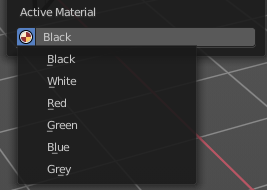
The current active material.
| Entry | What it does |
|---|---|
| Material drop down box | The list of available materials. |
| Material Edit Box | The currently active material. Rename it by clicking into the field. |