

































































Data Structure
Each .blend file contains a database of scenes, objects, meshes and textures. Learn how data-blocks link, share and get cleaned up.
Data System
Each .blend file contains a database. This database contains all scenes, objects, meshes, textures, etc. that are in the file.
A file can contain multiple scenes and each scene can contain multiple objects. Objects can contain multiple materials which can contain many textures. It is also possible to create links between different objects.
Data-Blocks
The base unit for any Bforartists project is the data-block. Examples of data-blocks include: meshes, objects, materials, textures, node-trees, scenes, texts, brushes and even screens.
For clarity, bones, sequence strips and vertex groups are not data-blocks, they belong to armature, scene and mesh types respectively.
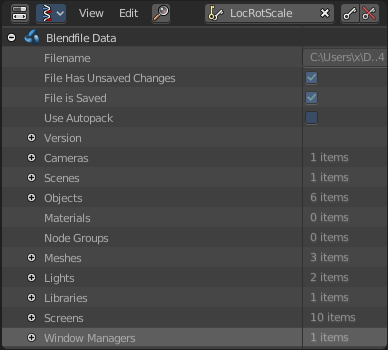
Some common characteristics:
- They’re the primary contents of the .blend file.
- They can link to each other, for reuse and instancing. (child/parent, object/object-data, with modifiers and constraints too).
- Their names are unique.
- They can be added/removed/edited/duplicated.
- They can be linked between files (only enabled for a limited set of data-blocks)
- They can have their own animation data.
- They can have custom properties.
When doing more complex projects managing data-blocks becomes more important, especially when inter-linking .blend files.
Users (Garbage Collection)
Bforartists follows the general rule where unused data is eventually removed.
Since its common to add and remove a lot of data while working, this has the advantage of not having to manually manage every single data-block.
This works by skipping zero user data-blocks when writing .blend files.
In some cases you want to save a data-block even when its unused (typically for re-usable asset libraries). see Fake User.
Fake User
Since zero user data-blocks aren’t saved. There are times when you want to force the data to be kept irrespective of its users.
If you’re building a .blend file to serve as a library of things that you intend to link-to from other files, you’ll need to make sure that they don’t accidentally get deleted from the library file.
Do this by giving the data-blocks a Fake User, by pressing the F button next to the name of the data-block. This prevents the user count from ever becoming zero: therefore, the data-block won’t be deleted. (since Bforartists doesn’t keep track of how many other files link to this one.)
Users (Sharing)
Many data-blocks can be shared among other data-blocks,
Examples where sharing data is common.
- Sharing textures among materials.
- Sharing meshes between objects (instances).
- Sharing animated actions between objects, for example to make all the lights dim together.
You can also share data-blocks between files, see.
- linked libraries.
Removing Data-Blocks
As covered in Users (Garbage Collection), data-blocks are typically removed when they’re no longer used.
There are some exceptions to this however.
The following data-blocks can be removed directly: Scene, Text, Group and Screen.
Other data-blocks such as groups and actions can be Unlinked from the Outliner context menu.
Tip: Some data (images especially) is hard to keep track of, especially since image views are counted as users.
For data-blocks that can be unlinked - hold Shift while pressing on the X button, This force-clears the user-count, so the data-block will be removed on reload.
Data-Block Types
For reference, here is a table of data-blocks types stored in .blend files.
| Link: | Library Linking, supports bing linked into other blend files. |
| Pack: | File Packing, supports file contents being packed into the blend file. |
| Action | ✓ | ✗ | Stores animation F Curves. Used as data-block animation data, and the Non-Linear-Editor. |
| Armature | ✓ | ✗ | Skeleton used to deform meshes. Used as object-data & by the Armature Modifier. |
| Brush | ✓ | ✗ | Used by paint tools. |
| Camera | ✓ | ✗ | Used as object-data. |
| Curve | ✓ | ✗ | Used by camera, font & surface objects. |
| Font | ✓ | ✓ | References font files. Used by Font object-data. |
| GreasePencil | ✓ | ✗ | 2D/3D sketch data. Used as overlay helper info, by the 3D-View, Image, Sequencer & Movie Clip editors. |
| Group | ✓ | ✗ | Reference object’s. Used by dupli-grous & often library-linking. |
| Image | ✓ | ✓ | Image files. Used by textures & shader nodes. |
| Lamp | ✓ | ✗ | Used as object-data. |
| Lattice | ✗ | ✗ | Grid based lattice deformation. Used as object-data and by the Lattice Modifier. |
| Library | ✗ | ✓ | References to external .blend files. Access from the outliner’s Blend file view. |
| LineStyle | ✓ | ✗ | Used by the FreeStyle render-engine. |
| Mask | ✓ | ✗ | 2D animated mask curves. Used by compositing nodes & sequencer strip. |
| Material | ✓ | ✗ | Set shading and texturing render properties. Used by objects, meshes & curves. |
| Mesh | ✓ | ✗ | Geometry verts/edges/faces. Used as object-data. |
| MetaBall | ✓ | ✗ | An isosurface in 3D space. Used as object-data. |
| MovieClip | ✓ | ✗ | Reference to an image sequence or video file. Used in the motion-tracking editor. |
| NodeGroup | ✓ | ✗ | Collections of re-usable nodes. Used in the node-editor. |
| Object | ✓ | ✗ | An entity in the scene with location, scale, rotation. Used by scenes & groups. |
| Particle | ✓ | ✗ | Particle settings. Used by particle systems. |
| Palette | ✓ | ✗ | Store color presets. Access from the paint tools. |
| Scene | ✓ | ✗ | Primary store of all data displayed and animated. Used as top-level storage for objects & animation. |
| Screen | ✗ | ✗ | Screen layout. Used by each window, which has its own screen. |
| ShapeKeys | ✗ | ✗ | Geometry shape storage, which can be animated. Used by mesh, curve and lattice objects. |
| Sounds | ✓ | ✓ | References to sound files. Used by speaker objects and the game-engine. |
| Speaker | ✓ | ✗ | Sound sources for a 3D scene. Used as object-data. |
| Text | ✓ | ✗ | Text data. Used by Python scripts and OSL shaders. |
| Texture | ✓ | ✗ | 2D/3D textures. Used by materials, world and brushes. |
| World | ✓ | ✗ | Used by scenes for render environment settings. |